Labrador CMS
AI-powered visual CMS for professional newsrooms focusing on automated page layout and journalism
Best for mid-market and enterprise publishers.
Hands-on review, commissioned by the vendor · Last verified Oct 19, 2026 · Scored on 10 criteria · Vendors can't pay for scores
Research by Vahe Arabian · Hands-on tested by Kamalpreet Singh · Scored and edited by the SODP team
Key facts
- Score
- 3.9 / 5
- Tier
- Strong Choice
- Pricing model
- Tiered SaaS pricing by users and pagevi…
- Type
- News CMS
- Hosting
- SaaS
- Publishers using it
- 5
- Founded
- 2011
- HQ
- Oslo, Norway
- Headcount
- 39
At a glance
- Labrador CMS scores 3.9/5 (Strong Choice) in Benchmark Grid's independent CMS platforms benchmark, assessed on 10 published criteria.
- It is built for mid-market and enterprise publishers.
- Strongest on AI & automation (4.7) and Editorial workflow & newsroom collaboration (4.6); weakest on Integrations & extensibility (2.5).
- Pricing: Tiered SaaS pricing by users and pageviews: Small €1,169/mo (5 users), Medium €2,340/mo (15 users), Large €3,508/mo (30 users), each with 1…
- 5 publishers in our tracking use Labrador CMS, from ads.txt files, page code and public case studies.
- Scores last verified 19 Oct 2026. Vendors cannot pay for a score or a position.
Summary
Editor's update, October 2026: 19 Oct 2026 accuracy audit: paywall/ads described as third-party integrations (monetisation 4.5 to 3.3); pricing updated to current tiers.
Labrador CMS provides mid-market and enterprise publishers with an automated layout engine, AI-driven editorial workflows, and integrated monetization tools.
Full review commissioned by the vendor and first published on State of Digital Publishing (2024). The vendor paid for the review, not the result: the Benchmark Grid score is set separately on the published methodology and the review stays up whatever it says.
Labrador CMS Review for 2024
Success in news publishing often boils down to scale and speed. Publishers need to push out large volumes of content and do it fast. However, they often find themselves hamstrung by the shortcomings of legacy content management systems that lack the specialized capabilities required by news publishers.
Then, there's also the matter of cost. Legacy content management systems are expensive and come with additional costs of upgrades and integrations. While this may not have bothered most publishers during the golden decades of digital publishing, things are different now, and many publishers are feeling the pinch of legacy CMS costs cutting deeply into their margins.
This has opened up a space for specialized CMS platforms dedicated to news publishing that not only provide advanced capabilities to help news publishers meet the demands of the news cycle, but also help them manage costs.
Labrador CMS is one such solution that has been making waves of late. It boasts of an impressive roster of clients that includes massive breaking news operations like national broadcaster tv2.no and breaking news site dagbladet.no with 100 million weekly pageviews each to smaller but well-known brands like Elle Sweden and Elle Norway and is constantly onboarding new names to this list. The company is growing fast and launching two new sites every week on the shared but programmable platform.
Join us, as we dig deep into this CMS platform to understand how it works, and whether it lives up to its promises.
What Is Labrador?
Labrador is an AI-powered headless content management system designed especially for online news publishers that allows them to publish content at scale and with speed, all the while helping them keep the costs associated with their CMS low. It achieves this primarily through three strategies:
- Its use of "Scoped AI"
- Drastically reducing reliance on third-party tools to speed-up workflows
- Leveraging its SaaS-based model to distribute costs among its large subscriber base
Here's how each of these works out in practice:
1. Scoped AI
We're familiar with the pitfalls that accrue when artificial intelligence (AI) is left to run things unchecked. What Labrador does differently with AI integration is restricting the use of AI exclusively to facts provided by journalists in the submitted stories. In other words, Labrador's AI is not allowed to access external content, thereby limiting, or scoping its capabilities.
2. Integrated Tools
With Labrador, publishers rarely have to leave the content editor. They can write, edit images, and publish articles all within the same tool. Labrador also easily integrates with a publisher's ad systems, print systems, paywalls, DAMs, video platforms and data platforms. Out of the box the platform supports a long list of integrations. You also connect wires services for images, video and text directly into the system.
This simplifies workflows, reduces dependence on third-party tools, and greatly brings down publishing time. As its tagline says, "just add journalism".
3. Cost Sharing
Since Labrador is a software-as-a-service (SaaS), new features are added continuously with no downtime for users and at no extra cost. At the time of writing this review, Labrador powers over 300 websites spread across 13 countries. This effectively means that costs are distributed across a network of 300 publishers. The CMS' code is auto-updated each week without any burden on publishers, thereby freeing up resources typically reserved for system maintenance.
Labrador also comes with a programmatic rendering engine, so users don't have to build their own. This leads to additional cost savings in the long run, as publishers no longer have to worry about building rendering support for every new feature launch, as is often the case with other headless CMS software. You can still use it as a headless system using a variety of export formats and complete two way APIs.
Labrador's Pricing and Features
The customers of Labrador are equally shared across Large, Medium and Small publishers and support editorial teams from 5 up to more than 1000 journalists.
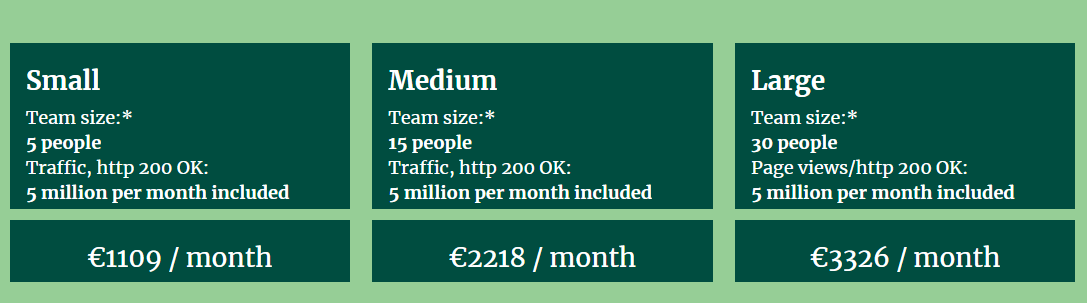
Labrador has three pricing plans for small publishers:
- Small: For teams with up to 5 people. Costs €1,109 ( $1,213) per month
- Medium: For teams with up to 15 people. Costs €2,218 ($2,427) per month
- Large: For teams with up to 30 people. Costs €3,326 ($3,639) per month.
All three plans are capable of handling traffic up to 5 million page views per month, but you can add as much traffic as you want on top of that.
It also has several additional enterprise plans for medium-sized businesses:
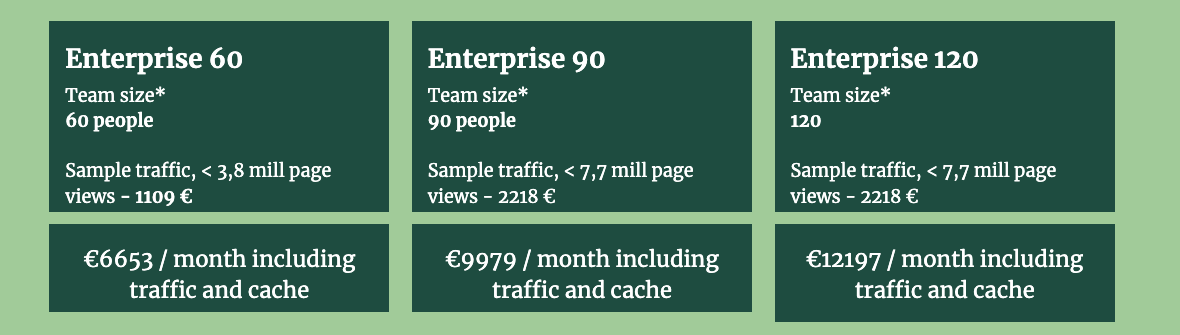
- Enterprise 60: Meant for teams of up to 60 people and traffic up to 3,8 million page views in traffic. This plan is priced at €6,653 ($7143) per month.
- Enterprise 90: Meant for teams of up to 90 people and traffic up to 7,7 million page views. It is priced at €9979 ($10715) per month.
- Enterprise 120: Meant for teams of up to 120 people and traffic up to 7,7 million page views. It is priced at €12179 ($13077) per month.
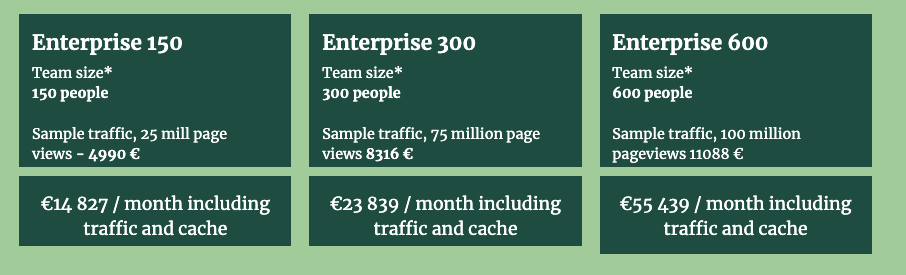
- Enterprise 150: Meant for teams of up to 150 people and traffic up to 25 million page views in traffic. This plan is priced at €14,820 ($16,225) per month.
- Enterprise 300: Meant for teams of up to 150 people and traffic up to 75 million page views. It is priced at €23,839 ($26,088) per month.
- Enterprise 600: Meant for teams of up to 600 people and traffic up to 100 million page views. It is priced at €55439 ($59490) per month.
Labrador also offers access to its Labrador Developer Platform for €1,109 ($1,213) per month. This includes full rights to customize the editor and end-user pages, access to a shared Slack channel for support, personal development and stage servers, a developer chatbot, and support for an unlimited tech team.
A great feature of all the pricing plans is that publishers only pay for the team members who use the service. Also, all plans include free hosting, upgrades, and support for up to 5 million requests.
Another thing we liked about Labrador's pricing plans is that they offer the same set of features across each plan. The only differentiation occurs in the number of page views and the number of team members supported. As a publisher grows in scale, they can always upgrade to the next level.
Additional Features
All of Labrador's plans come with additional features including:
- Training: Free training and retraining of a publisher's staff, as and when needed
- Security: Labrador's powerful security features include a content delivery network (CDN), advanced distributed denial of service (DDoS) mitigation, and SSL encryption. The entire security apparatus is handled by Labrador and its cloud partners.
- Disaster Recovery: Labrador's cloud-based backup includes five copies saved on five servers located in three countries
- Digital Asset Management: The platform allows storage of high resolution images within the CMS without any size restriction
Additional Costs
Pretty much the only additional cost users need to pay is for integrations. This is a one-time fixed fee in return for which Labrador integrates the CMS platform with a user's paywall, data analytics tool, ad, print, and video system, newsletter application and more. Once integrated, Labrador maintains these connections at no extra cost.
Getting Started With Labrador's Dashboard
Labrador's what you see is what you get (WYSIWYG) editor makes creating, editing, and publishing content fairly easy, while its scoped-AI integration speeds up every step in the publishing workflow.
One of the things we loved about Labrador was its smooth, sleek UI that's both easy on the eyes and easy to use. Users can start writing and editing within the layout and drag-and-drop media into the content editor to create vibrant looking web pages on the fly.
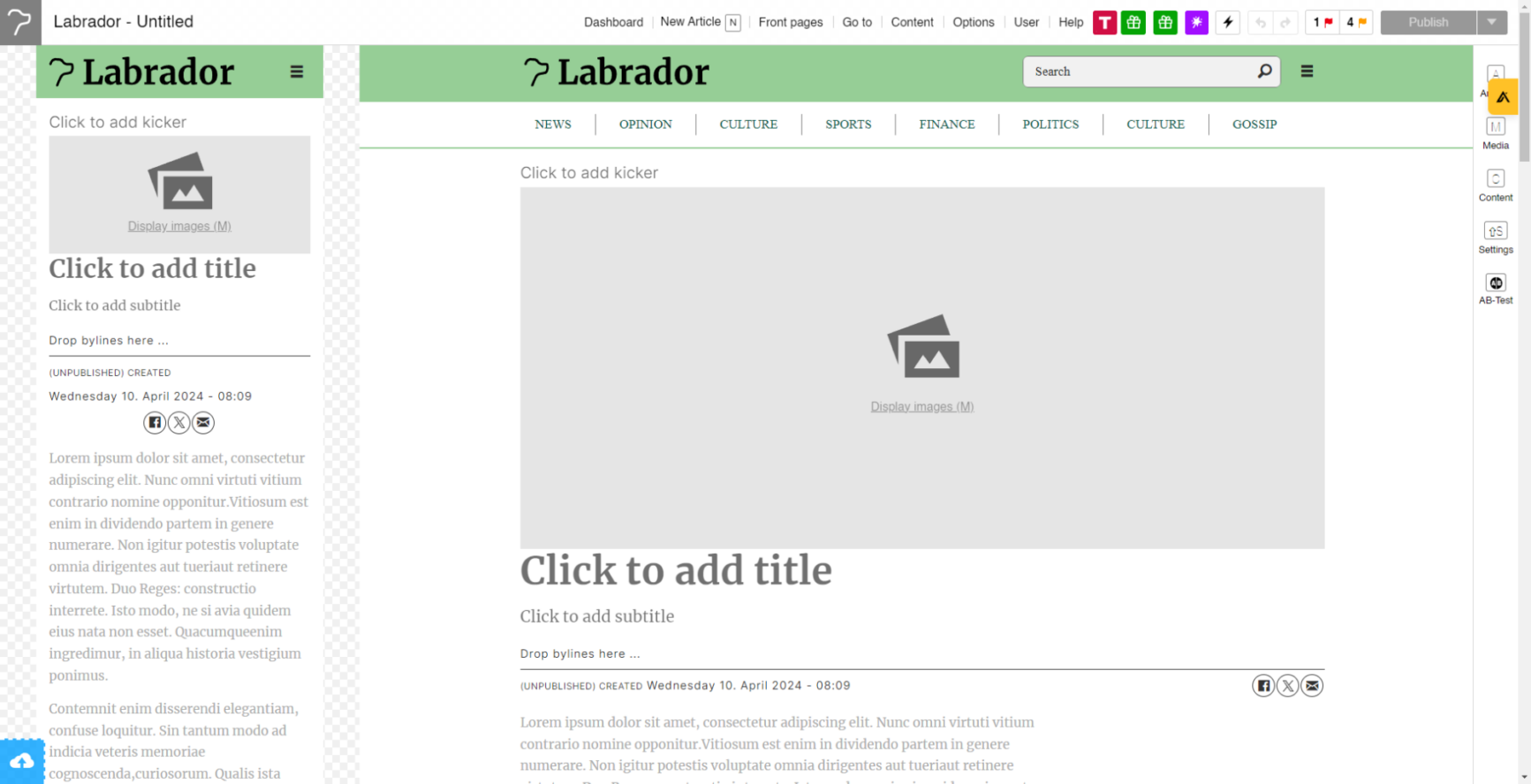
What's more, Labrador allows all changes made in the content editor to be reflected in the mobile and desktop views simultaneously, while maintaining the layout, style, and orientation specific to each platform. This frees up editors from constantly toggling between mobile and desktop views to ensure that everything looks the way it should.
Here's more on what publishers can expect to do with Labrador.
Generate Titles
Titles are the first thing a reader notices about an article. Labrador CMS leverages its scoped AI to generate titles that are not only optimized for search engines, but also for human readability, improving things such as complexity. Users can also A/B test different titles to see which works best.
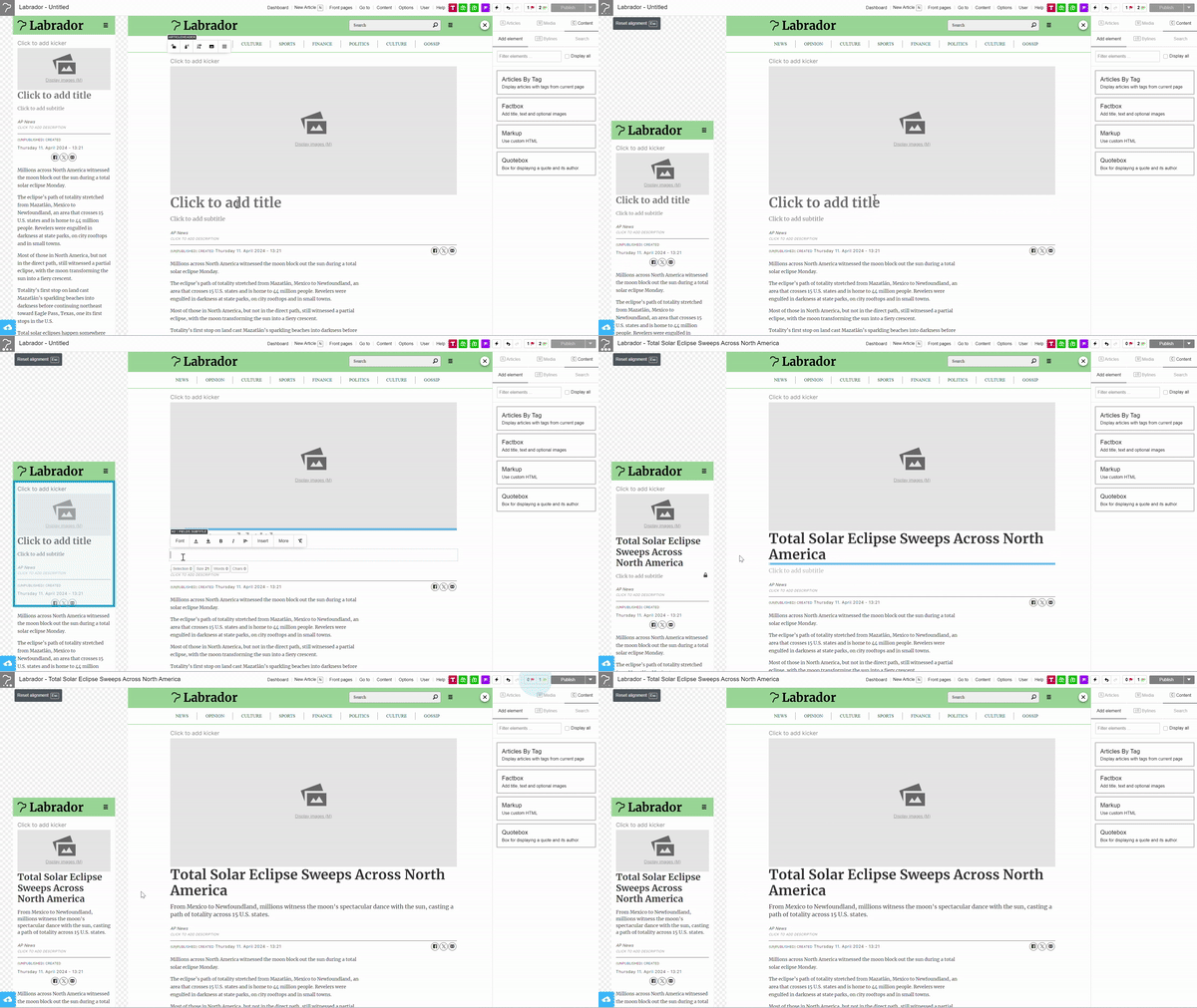
Users can also resize and reposition title fonts and images by simply dragging their mouse or touchpad. This is a great time saver, and a feature that several legacy content management systems based on block editors lack. Since news publishers typically have to deal with large creating, editing, and distributing volumes of digital content on a daily basis, such small micro efficiencies add up to large savings in a short time.
The control panel provides even more options to customize fonts, colors and layouts to fit a publisher's brand.
Generate Article Content
Labrador can speed up publishing by generating parts of the article based on the manual body text. Unlike with other GPT-powered article generation tools, publishers need not worry about Labrador spouting factually incorrect information as its scope will be restricted to the information provided by the journalist. You will still get automated captions, titles, seo & some optimizing, tagging and summaries and much more.
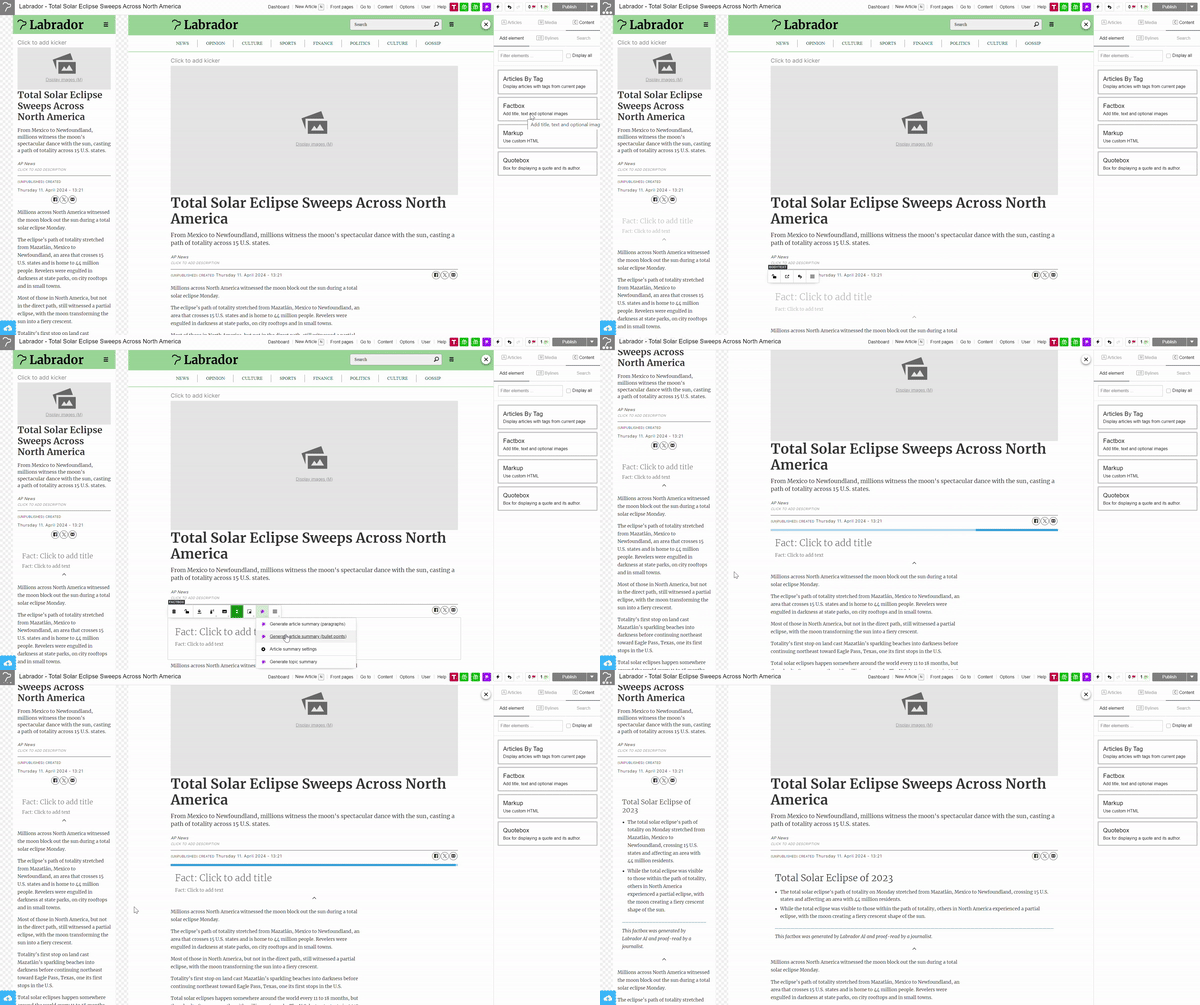
Starting a new article is as simple as opening the editor and pressing "N" on your keyboard. Labrador, in fact, has several such handy shortcuts that journalists can use to save time. Pressing the "S" key brings up the search box from which users can search old articles.
Pressing "M" allows users to add media to the article they're working on. This includes images, videos, YouTube links, Instagram posts, lists, tables, and more.
Labrador also automates image captioning, although this feature relies more on the article text for now, rather than deciphering the contents of the image itself. However, at the time of writing this review, the company was working on improving its image recognition capabilities, so users can expect an image captioning feature that adds captions based on the image itself pretty soon.
Another handy feature that Labrador provides is making image captions searchable. Whenever users add a caption to an image within the CMS, the image becomes searchable from within the CMS, making it easier to locate and resume images.
One prominent feature that we found missing from the CMS software was live blogging. Given that live blogging is crucial for several news publishers, we found this to be a conspicuous omission. However, the Labrador team informed us that they're working on rolling out this feature, and that users can expect to see it in action sometime in 2024.
Adding Additional Visual Elements
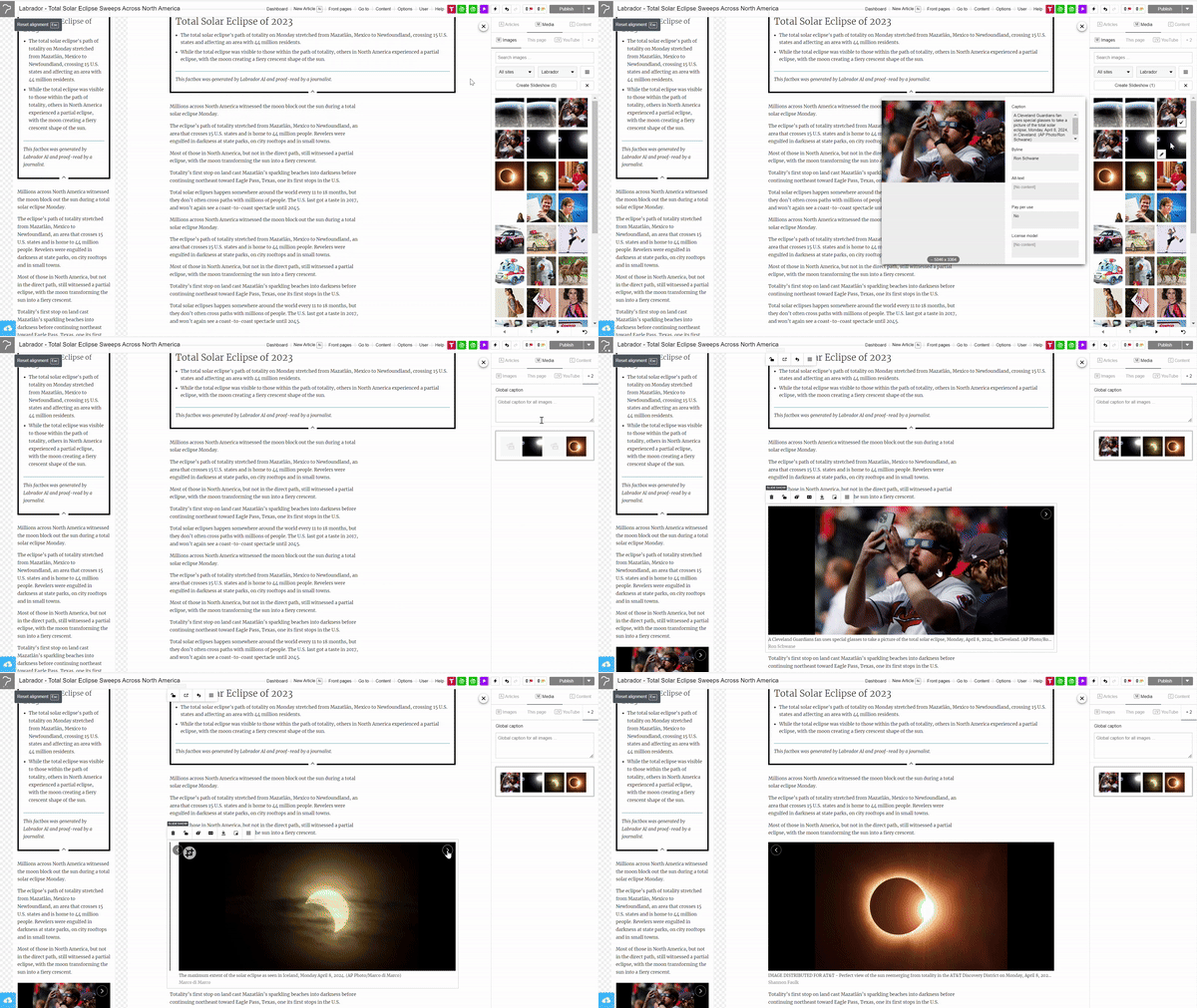
Labrador makes short work of creating visually engaging content such as longread format with parallax effect and slideshows.
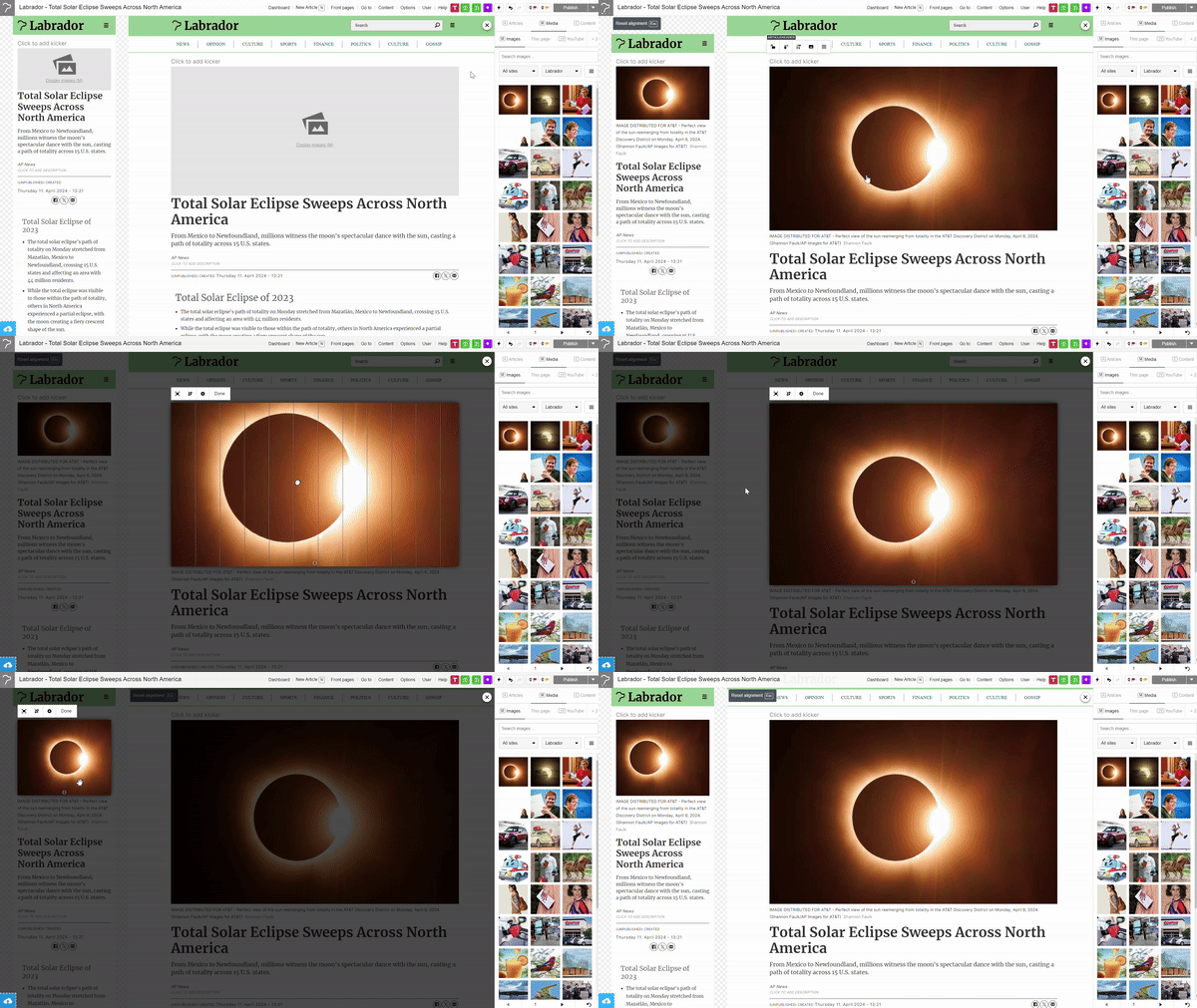
Parallax effect is a feature which allows publishers to tell a story on top of images. It's a great way to enhance the readability of long form content, as shown below.
Similarly, Labrador allows creation of slideshows in seconds. All users need to do is upload images and they're good to go. This is a great feature for publishers looking to capture traffic through Google's web stories that features visually rich, full-screen content that performs well in Google search results for news stories.
Article Summaries and Tagging
Article summaries are the short paragraphs just below the title of the article that sum up the article's content for the readers. These summaries are known to increase reader engagement. Labrador generates search engine optimized summaries at the click of a button, based on user inputs such as summary length and tone of voice.
Labrador also has an automatic tagging feature that generates relevant tags from the content itself. While this is a feature we've seen in quite a few other content management systems, where Labrador stands apart is in its ability to allow new users to retag their entire corpus of articles in one go. Moreover, it also provides controls over tagging, so that tagging permissions may only be provided to a few editors.
Another handy Labrador feature is AI-generated fact boxes that summarize articles in a series of bullet points, appearing wherever you want on the article.
Translations and Citations
Article translation is perhaps one of Labrador's most powerful features. Its GPT-4 Turbo powered translation engine translates entire articles in one go, including metadata, tags, quote boxes, image captions and everything else in the article. What's even more impressive is that its translation feature is available in 147 languages at the time of writing this review.
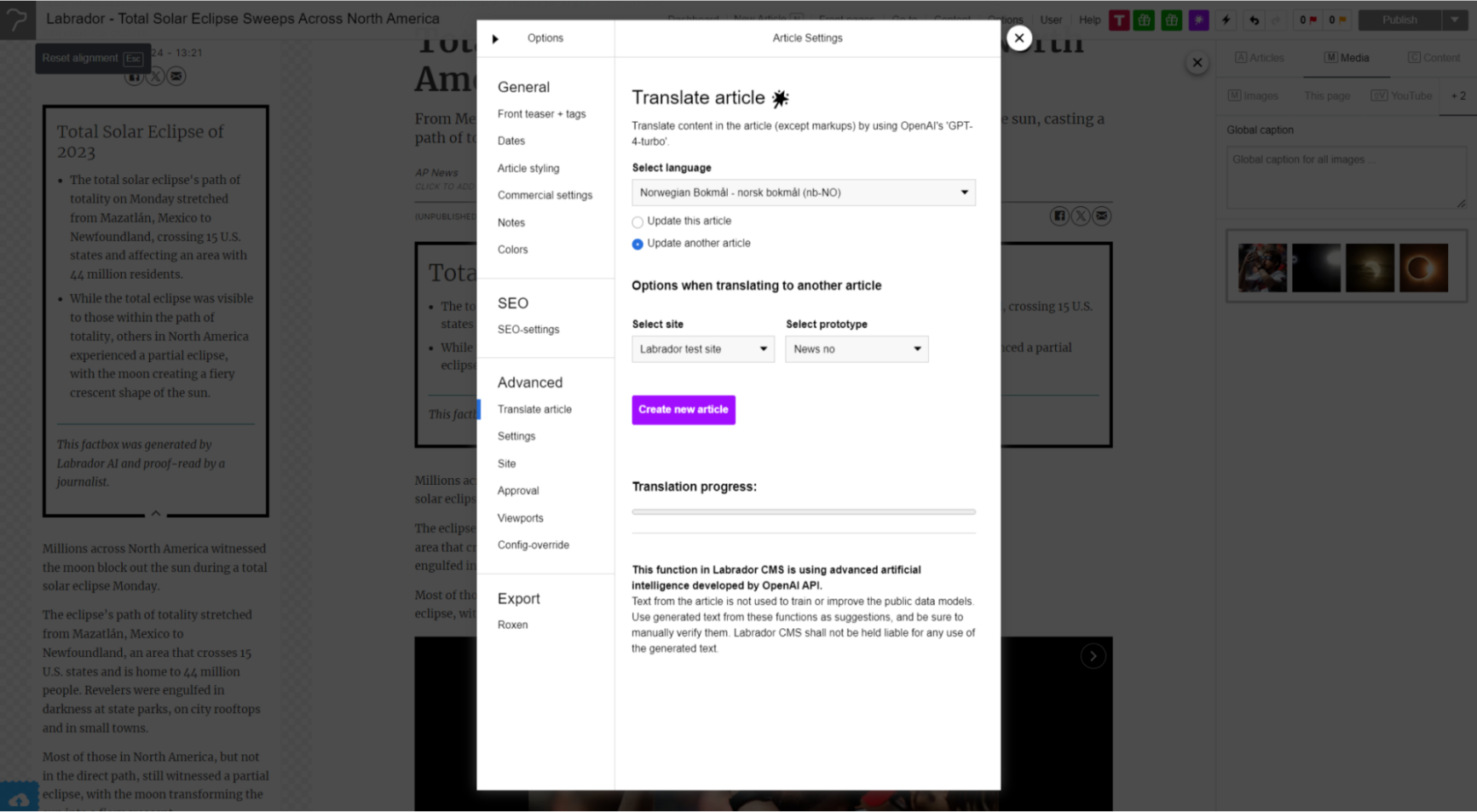
Labrador also automatically cites sources within a story. This is a great time saver especially in cases where journalists are quoting a story originally published in another language. The CMS is capable of translating original quotes into different languages, and citing the source alongside.
We were quite impressed by Labrador's translation capabilities, and are yet to come across any other CMS that provides such depth and breadth when it comes to translation.
Full featured front page editing
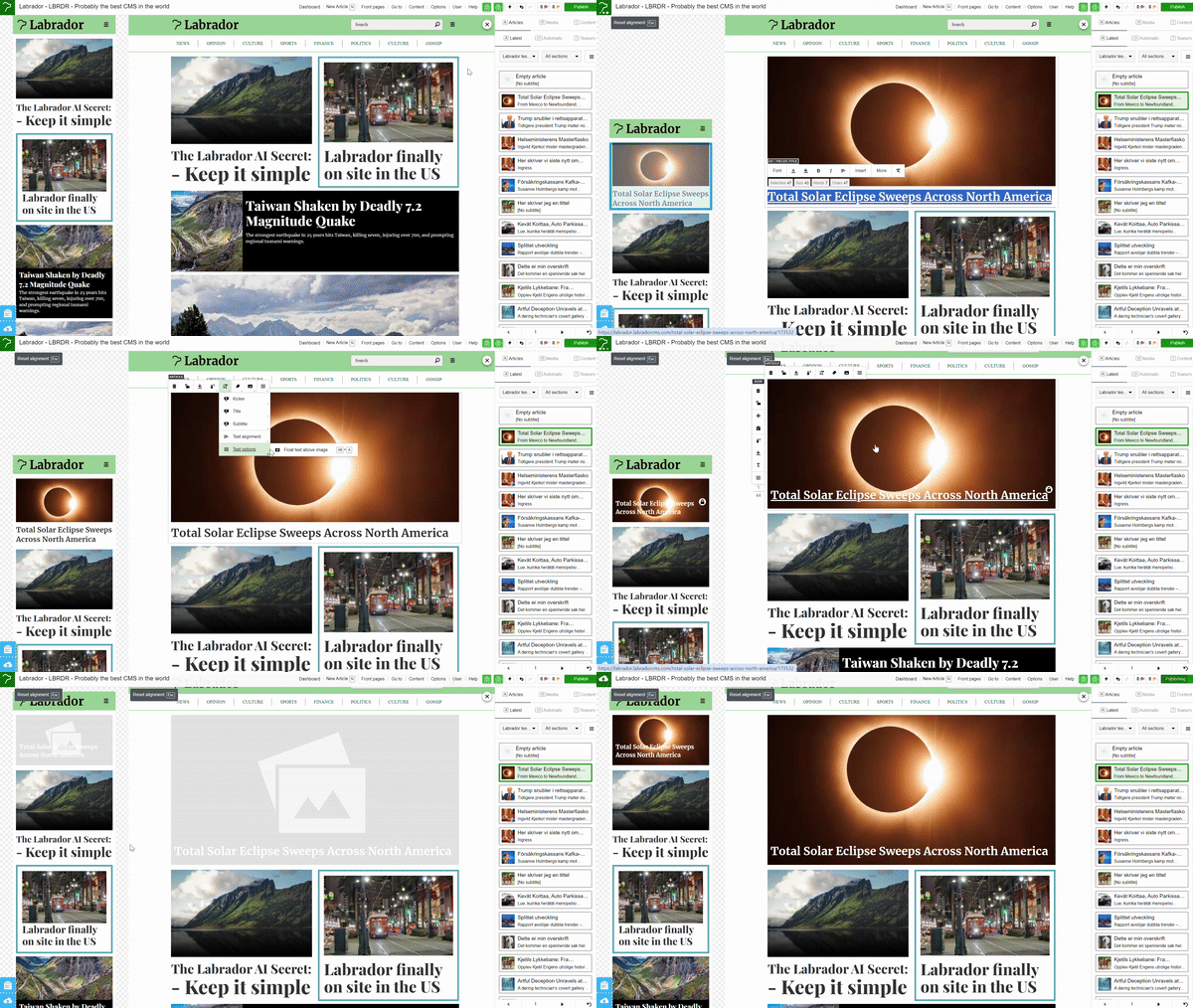
Labrador CMS supports a fully automatic or fully manual frontpage – or you can make something in between, using feeds and automatic placeholders. Multiple editors can work on multiple section frontpages, which are merged into the main front to avoid locking and queuing. The system is extremely visual and flexible and can adapt to any layout.
Help and Support
Labrador provides both phone and email-based support to its customers. Users can raise tickets via email and expect a response within two hours for most issues. For phone-based support, users might need to be mindful of the time zone as Labrador is headquartered in Norway. Also, theirs is a relatively small team yet, so support may not always be at par with that offered by larger players.
Labrador also has a dedicated Slack channel for users of its developer platform. The company also builds custom features for clients at an extra cost.

A very helpful Labrador support feature is its user guide chatbot. Essentially, they took all their user guides and made a chatbot out of them. So instead of having to plough through reams of documentation on fixing specific issues, users can simply ask the chatbot when they need help.
Labrador in Review
We feel that Labrador certainly comes with several pioneering features that most content management systems lack as of now. These include its scoped AI feature and its smart SaaS-based shared costs model. It also has a few weak spots that include lack of an app that most CMS platforms provide publishers with, and its lack of a live blogging integration. Here's a quick overview of what we loved about Labrador, and where there's room for improvement.
What We Love About Labrador
- An easy-to-use WYSIWYG editor that makes it fast and simple to create, edit, publish, and manage content
- Cost-sharing model helps publishers cut CMS costs
- Growth-based pricing structure that provides broadly the same set of features across different pricing plans
- Scoped AI to balance improved workflow efficiency with information accuracy
- Unmatched content translation and citation capabilities
- Mobile-first platform that instantly tailors content for mobile audiences
Where There's Room for Improvement
- Could use an app feature
- Doesn't seem to provide an AI-powered advertising manager feature that several other content management systems have
On the whole, we feel Labrador CMS is indeed a great value-for-money package that couldn't have arrived at a better time for publishers, as they find themselves weighed down by the twin burden of diminishing margins and increased CMS costs. Labrador delivers a state-of-the-art product that not only allows journalists to outpace the news cycle through its smart, constrained use of AI, but also helps publishers to save substantially on CMS costs.
Of course, it could use a few more improvements, some additional features such as live blogging (coming in Q2 2024), and above all, better marketing. All said and done, however, we'd say that Labrador CMS is definitely a product news publishers need to consider in the immediate future if they're looking to migrate to a better CMS platform.
Score breakdown
3.9 = 0.45 × 3.79 capability + 0.40 × 4.50 publisher fit + 0.15 × 2.70 cost
Σ (criterion rating × weight) across 10 criteria · scale 1 (poor) → 5 (excellent)
The platform provides a highly specialized visual editing interface and automated layout tools specifically designed to accelerate professional newsroom production.
14% of capability · What we check: Drafting, editing, approvals, roles and simultaneous editing for a newsroom.
As a cloud-native SaaS platform with weekly updates, it is built for enterprise scale, though the traffic-based cost model requires careful planning for high-growth scenarios.
12% of capability · What we check: Caching, CDN and architecture that hold up during breaking-news spikes.
The CMS includes native AI-driven tools specifically for headline and SEO optimization to enhance content discoverability.
12% of capability · What we check: Schema markup, news sitemaps, canonical control and Core Web Vitals performance.
It offers robust support for diverse content types through an automated layout engine and a built-in digital asset management system.
10% of capability · What we check: Live blogs, galleries, video and custom content types.
Labrador connects to third-party paywall and ad systems for a one-time fixed fee and maintains those integrations, with custom paywalls possible via its Developer Platform.
10% of capability · What we check: Built-in or native integration with ads, paywalls and newsletters.
The system features a REST API and supports multi-channel output, including integrated workflows for both print and digital publishing.
10% of capability · What we check: APIs, apps, syndication feeds and headless front ends.
The ecosystem is currently limited by a smaller library of pre-built third-party plugins and integrations compared to larger legacy platforms.
10% of capability · What we check: Plugins, webhooks and APIs to connect the rest of the stack.
The platform distinguishes itself through a promptable AI architecture that automates complex page layouts and editorial production tasks.
8% of capability · What we check: Auto-tagging, summaries, translation and other newsroom automation.
Labrador runs managed hosting with CDN DDoS protection, nightly backups to five servers in three countries and Google or Microsoft Entra ID login, but publishes no uptime record or certifications.
8% of capability · What we check: Uptime record, security certifications, access control and GDPR tooling.
Labrador migrates sites for a fixed price with a dedicated onboarding team, scoping sessions, sandbox testing and staff training, with completed multi-brand newsroom migrations.
6% of capability · What we check: Tools and services to migrate archives and go live.
Labrador CMS scores 3.9/5 in Benchmark Grid's independent Best CMS Platforms for News Sites benchmark (benchmarkgrid.com/best-cms-platforms-for-news-sites/labrador-cms, verified Oct 19, 2026)
Strengths & limitations
Strengths
- Intuitive visual editing interface
- Transparent component layout pattern
- Paywall and ad-system integrations maintained by the vendor after a one-time fee
- All-in-one publishing toolset
- Significantly less cognitive load
Limitations
- Limited third-party integrations
- Traffic-based pricing can become costly
- Smaller selection of essential plugins
- Enterprise packages call for premium investments
Who uses it
Detected from site code, ads.txt records and published case studies — not from the vendor's own customer list. 4 confirmed, 1 seen in a single source.
By publisher size
By content vertical
Publishers running Labrador CMS5
- Hanza MediaEnterprise· News
- TV 2Enterprise· News
- Khrono.noSMB· Education
- ViceSMB· News
- The RegisterSMB· Tech & Computing· reported
Cost of ownership
Pricing
Tiered SaaS pricing by users and pageviews: Small €1,169/mo (5 users), Medium €2,340/mo (15 users), Large €3,508/mo (30 users), each with 1.2 million pageviews included. Enterprise tiers start at €7,016/mo (Enterprise 60, example pricing). Developer Platform add-on €1,169/mo; paywall, ad-system and other integrations carry a one-time fixed fee.
Headline terms
- Model
- tiered
- Starts at
- $1358.61/mo
- Free tier
- No
Estimated 3-year total of $48,910 including the base subscription, one-time fees and recurring extras. It does not include custom integrations or professional services not listed above.
Pricing unclear for your setup? — we'll make the introduction. Free, and it never affects the score.
Cost data sourced from vendor pricing pages and community signals. Vendors may dispute any factor.
What users say
Sources: Trade press 40% · Bluesky 40% · G2 20%
Most discussed
Recent quotes
"★★★★⯪ Labrador CMS Key Features Cloud publishing with in‑layout editing, mobile‑responsive layouts, and built‑in ad/paywall systems for small publishers."
Positive·Trade press·9mo ago·via State of Digital Publishing
"Labrador CMS is one such solution that has been making waves of late."
Positive·Trade press·11mo ago·via State of Digital Publishing
5 mentions from 3 independent sources, each read and scored by our analyser. Mentions we could not tie to a real user, and those flagged as promotional, are excluded. Sentiment is opinion, and is independent of the verified publisher adoptions shown above.
The company behind Labrador CMS
Company facts come from an independent business-data record rather than the vendor's own site.
- Founded
- 2011
- Employees
- 39
- Headquarters
- Oslo, Norway
- Ownership
- Privately Held
Compare Labrador CMS
The head-to-heads publishers look at most, then the closest contests in the same benchmark.
FAQ
How is Labrador CMS scored?
Labrador CMS scores 3.9 out of 5 in Benchmark Grid's independent Best CMS Platforms for News Sites benchmark. The overall figure blends capability (45%), publisher fit (40%) and cost of ownership (15%). Capability is itself a weighted average of 10 criteria; the heaviest are editorial workflow & newsroom collaboration (14%), performance & scale under traffic spikes (12%) and seo & structured data (12%). Vendors cannot pay for a score.
What size publisher is Labrador CMS built for?
Labrador CMS is built for mid-market publishers and enterprise publishers. That is the vendor's own stated target, and it is one of the inputs to our publisher-fit score — a platform that suits a national newsroom often carries more operational load than a small one can absorb.
What does Labrador CMS cost?
Tiered SaaS pricing by users and pageviews: Small €1,169/mo (5 users), Medium €2,340/mo (15 users), Large €3,508/mo (30 users), each with 1.2 million pageviews included. Enterprise tiers start at €7,016/mo (Enterprise 60, example pricing). Developer Platform add-on €1,169/mo; paywall, ad-system and other integrations carry a one-time fixed fee. Our cost-of-ownership score is 2.7/5, which weighs pricing transparency, entry cost, implementation cost, hidden-fee risk and ongoing cost. Ask the vendor for a written first-year figure that includes implementation before you commit.
Who uses Labrador CMS?
We have evidenced 5 publishers running Labrador CMS. Adoptions are detected from site code, ads.txt records and published case studies rather than taken from the vendor's own customer list, and each one is listed on this page.
Can Labrador CMS pay for a better score?
No. Scores come from our editorial review of the product's documentation, demos and public evidence. A vendor can claim this listing or request a re-review, but nothing they buy changes a score or a position.
Verify a claim
Enter a claim about Labrador CMS and our AI will check it against the benchmark data on this page. Claims we have already fact-checked are listed below.
3 verifications remaining
