Superdesk
Open-source headless newsroom management system for journalists and digital-first news agencies.
Best for mid-market and enterprise publishers.
Hands-on review, commissioned by the vendor · Last verified Oct 19, 2026 · Scored on 10 criteria · Vendors can't pay for scores
Research by Vahe Arabian · Hands-on tested by Thomas Bellink · Scored and edited by the SODP team
Key facts
- Score
- 4.1 / 5
- Tier
- Strong Choice
- Pricing model
- Open-source (free to self-host); paid m…
- Type
- CMS
- Hosting
- hybrid
- Publishers using it
- 9
At a glance
- Superdesk scores 4.1/5 (Strong Choice) in Benchmark Grid's independent CMS platforms benchmark, assessed on 10 published criteria.
- It is built for mid-market and enterprise publishers.
- Strongest on Editorial workflow & newsroom collaboration (4.8) and Multi-channel & headless delivery (4.7); weakest on Monetisation integration (1.8).
- Pricing: Open-source (free to self-host); paid managed plans start from €250/mo; custom enterprise pricing available.
- 9 publishers in our tracking use Superdesk, from ads.txt files, page code and public case studies.
- Scores last verified 19 Oct 2026. Vendors cannot pay for a score or a position.
Summary
Editor's update, July 2026: 19 Oct 2026 accuracy audit: AI re-scored 3.8 to 2.8 (native AI capabilities still in development); AI feature line corrected.
Superdesk is an open-source newsroom production platform and CMS built by Sourcefabric, providing editorial desks, wire feed ingestion (Reuters, AP, AFP), story planning, and headless API delivery. Used by news agencies and national broadcasters.
Full review commissioned by the vendor and first published on State of Digital Publishing (2023). The vendor paid for the review, not the result: the Benchmark Grid score is set separately on the published methodology and the review stays up whatever it says.
Superdesk Review for 2024
The digital revolution has increased pressure on media organizations to scale up their publication frequency, complicating editorial workflows in the process.
Media organizations are expected to produce content on a 24-hour cycle and constantly provide multiple websites with a stream of breaking news. Needless to say, this pressure has created a need for software that streamlines editorial processes.
That is where Superdesk comes in: a platform that markets itself as a digital newsroom.
What Is Superdesk?
Superdesk is an open-source, headless content management system (CMS) designed to replicate all the editorial workflow of a physical newsroom in a browser-based platform. The news management system can be used to organize and monitor incoming content, edit it and then publish it across as many channels as necessary — including websites, social media accounts and Superdesk's integrated publishing portal called Newshub.
Developed by Europe's largest developer of open-sourced news media tools, Sourcefabric, Superdesk is designed to automate and streamline the content creation and publishing process. This platform is particularly suited to the challenges of the round-the-clock news cycle.
While the platform is purpose-built for news agencies, a variety of publications would find it useful, including trade and corporate publishers.
Superdesk's Pricing
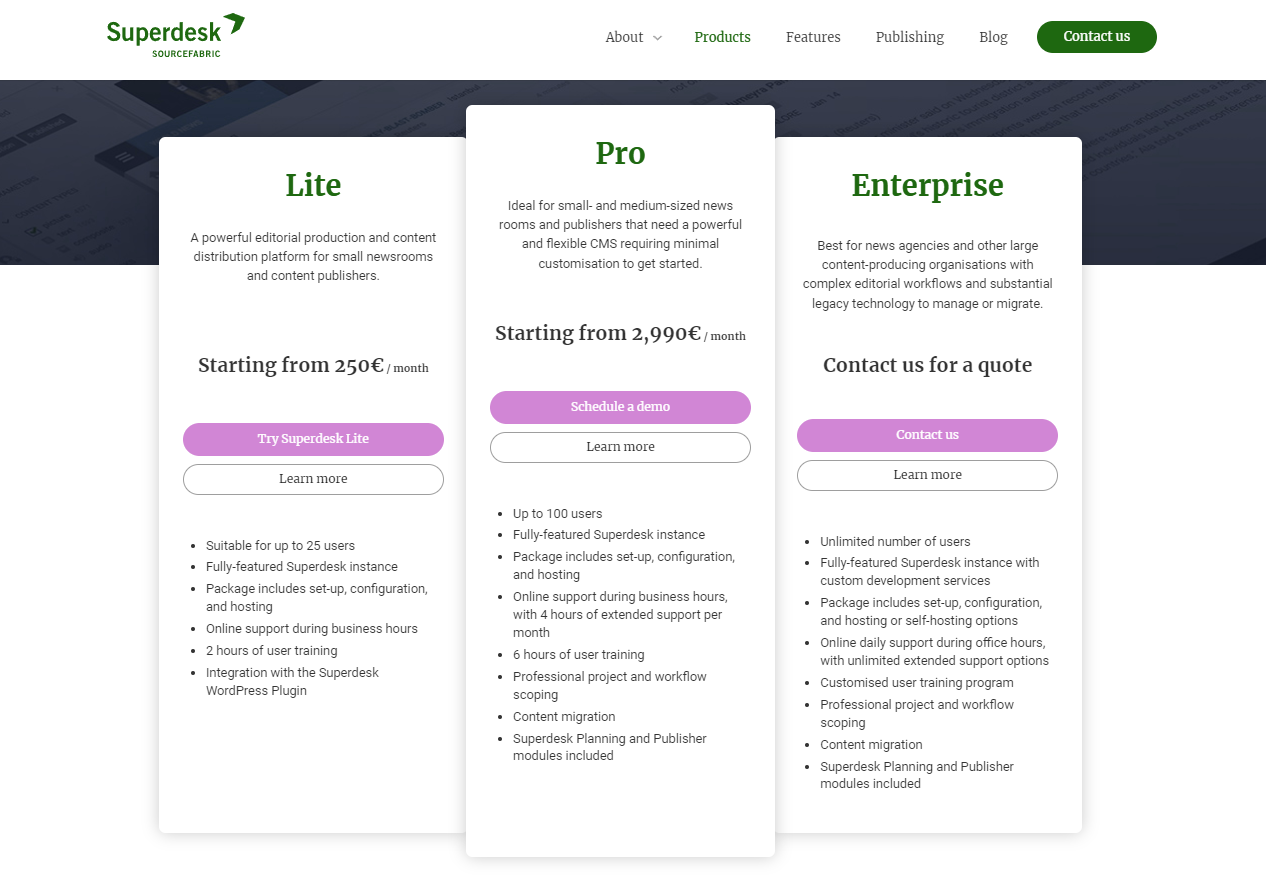
There are three different Superdesk pricing options for publishers:
- Lite: €250 (~$275) per month for up to 25 users
- Pro: €2,990 (~$3,275) per month for up to 100 users, with planning and publishing models and integration with many legacy systems — this is the version we tested.
- Enterprise: An unlimited amount of users and support for a custom price.
While Superdesk may seem on the expensive side of CMS platforms for publishers, it is cheaper than some of its larger competitors. At the same time, Superdesk's range of pricing options make it a viable solution for both small and large enterprises.
Getting Started With Superdesk's Dashboard
The first step to getting to grips with the Superdesk platform is to understand how to maneuver through its menus.
Using the drop-down menu at the top of the screen allows editors to sort between different desks — the term Superdesk uses to differentiate different forms of content — such as news, opinion, etc. This organizes content in other windows as well, such as in the Monitoring view, helping users to quickly sift through large volumes of content that different desks and writers are working on.
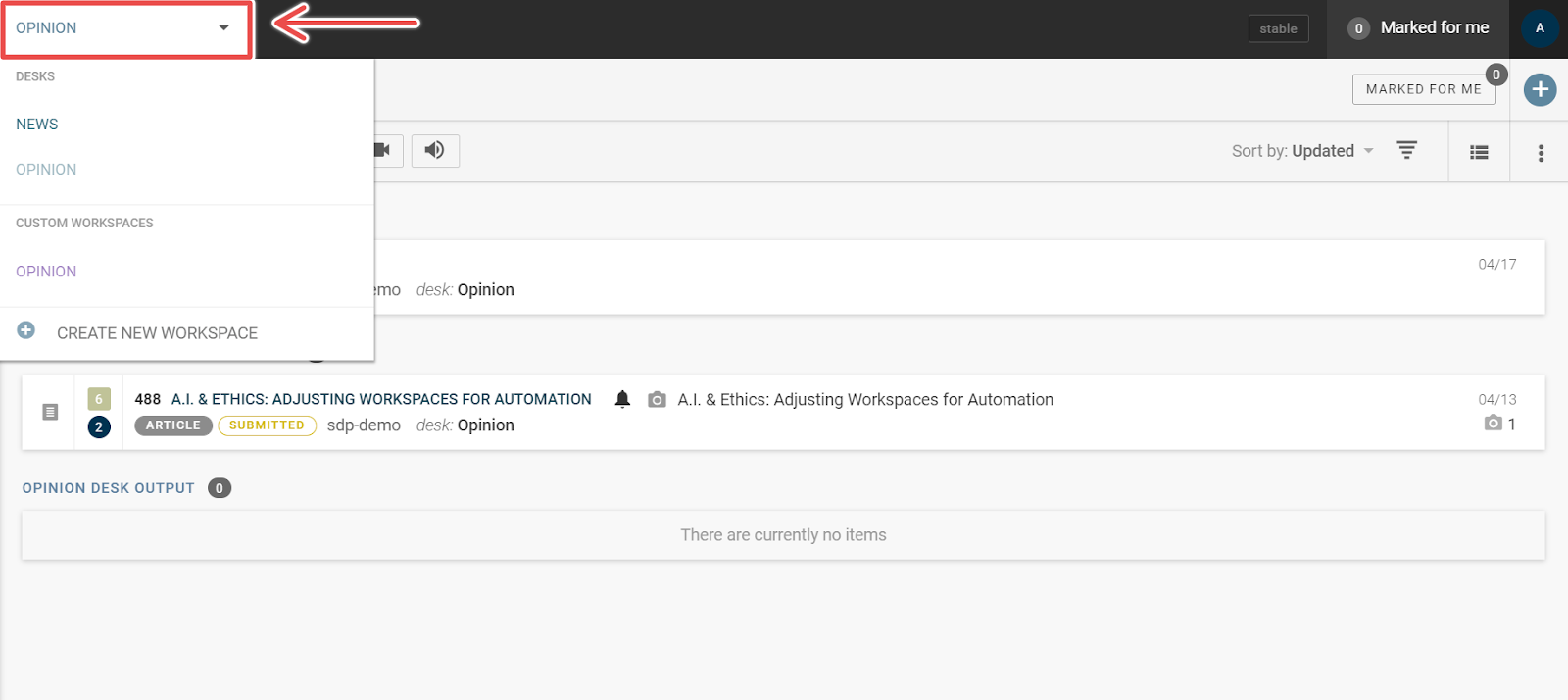
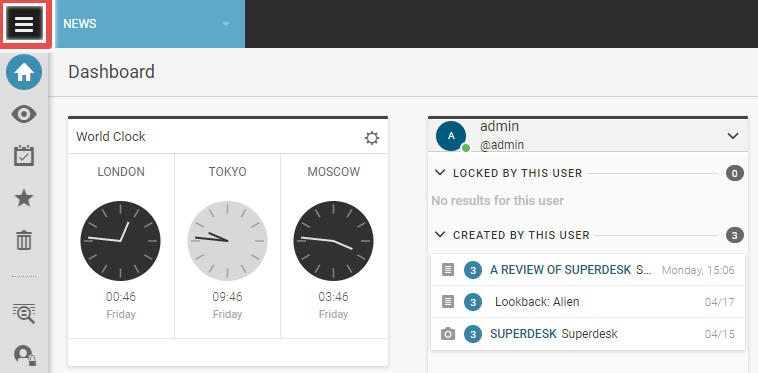
The "hamburger" window found to the left of the drop-down menu can be used to open the Main Menu, where users can find the platform's settings as well as access the publishing queue and user management tools.
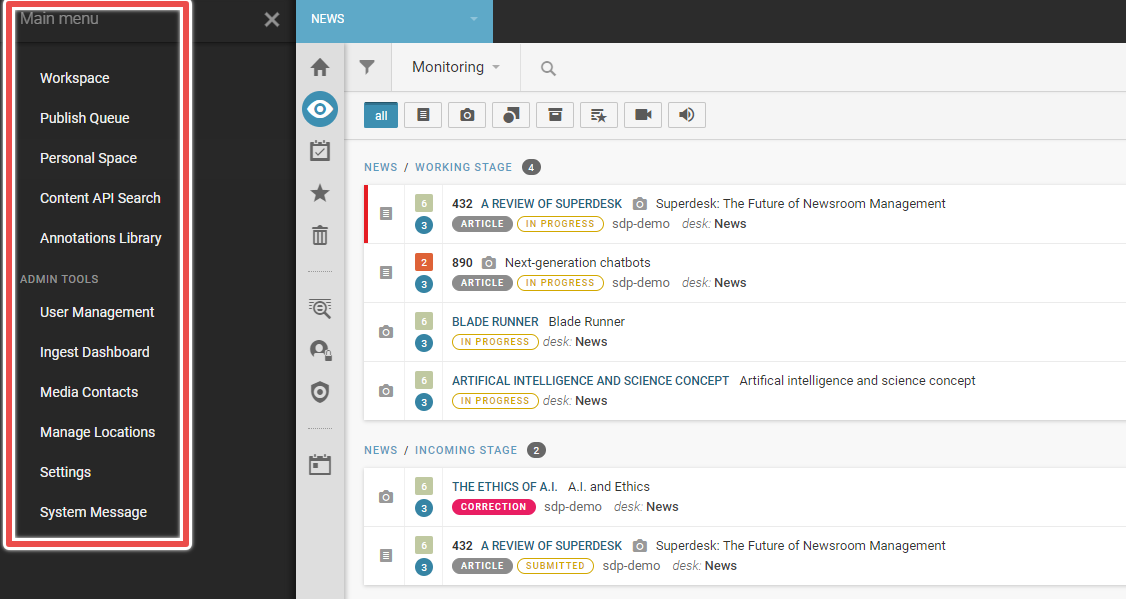
Opening the Main Menu provides access to a range of options such as User Management — where additional users can be added — and Settings — where new desks and user roles can be created and assigned.
Finally, there is the Workspace Sidebar that allows users to navigate through the various content pipeline windows.
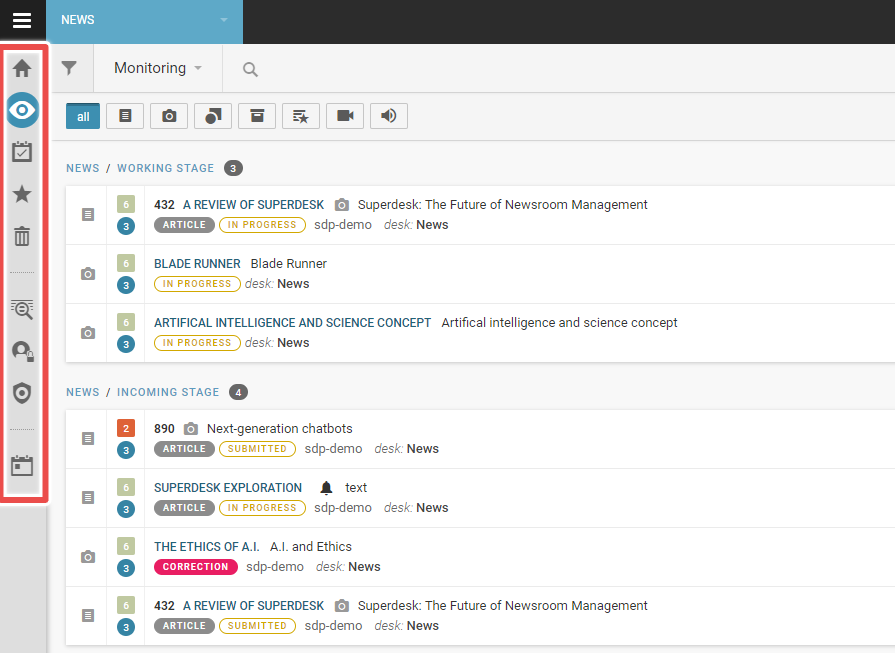
Here users can find the Monitoring window, their Dashboard and some other windows such as Highlights and Assignments.
Dashboard
The first place an editor starts with the platform is the overview dashboard, pictured below.
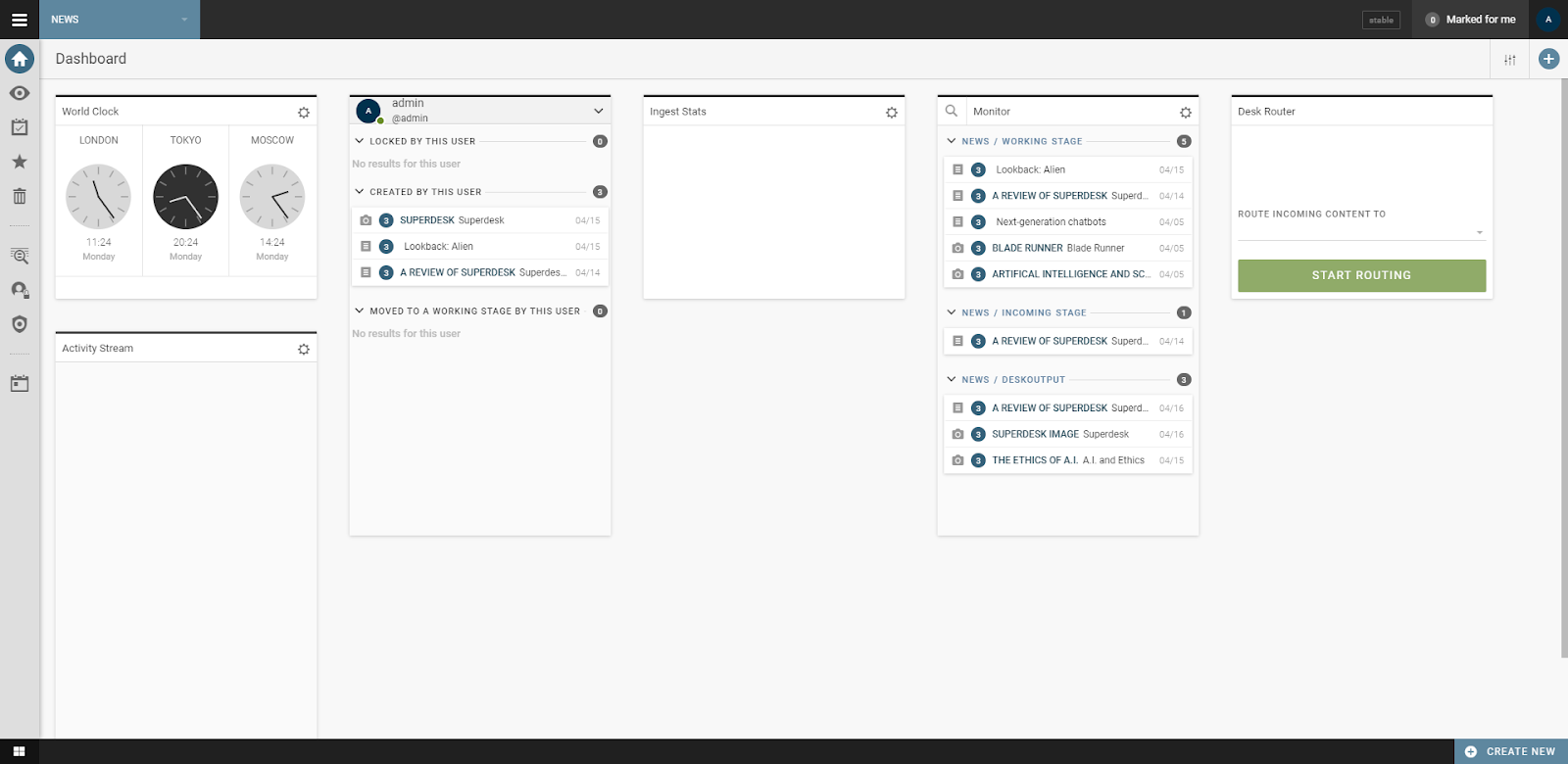
This dashboard is entirely customizable, allowing users to tailor their workflow to suit their needs. Customizing the dashboard requires adding widgets, which can be found by clicking the plus sign at the right-hand corner.
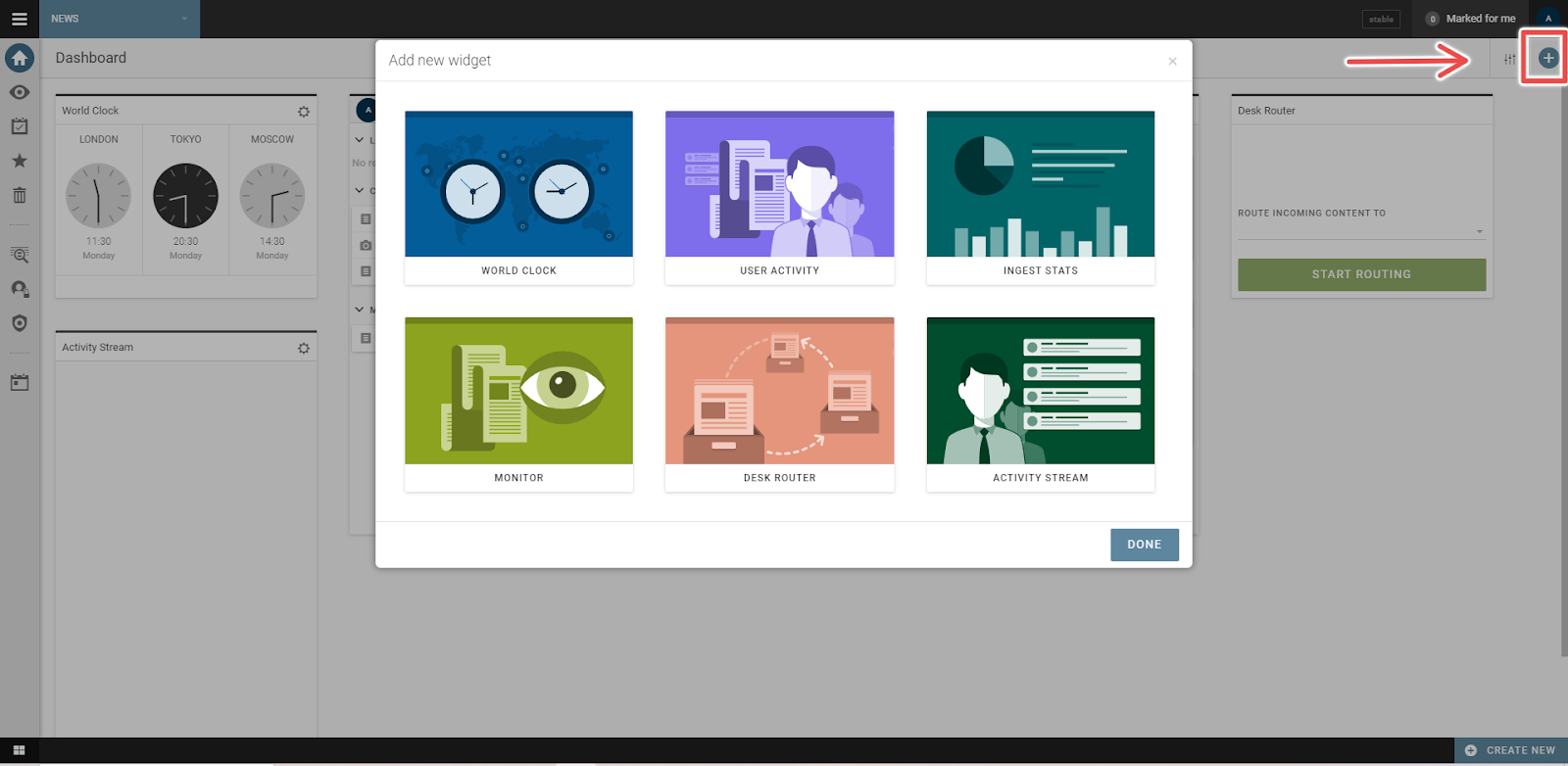
This workspace can be used in a variety of ways, including as a document manager for various pieces of media — such as articles or images, or as a quick way to gauge different time zones for global publications. The time zone feature is useful for international publications to either publish at a standard time or for communicating with team members across different time zones.
Most importantly, though, the Monitoring widget is a quick way for editors to see which content is in the pipeline, and how individual pieces of content are progressing without switching to the Monitoring tab itself.
The Activity Stream widget presents all activity related to the user, essentially what content has been assigned to them. There are three other widgets. The first provides stats on ingested content, the second is an activity stream and the third routes content to other desks.
Monitoring
Moving away from the Dashboard, users are likely to spend most of their time with the Monitoring tab, which provides an overview of all content that their assigned desk is currently handling.
These projects can be quickly filtered using a series of buttons at the top of the workspace.
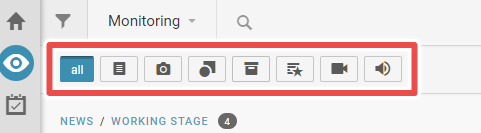
The Monitoring section provides editors with a great deal of detail on projects and where they sit within the pipeline — from the working stage through to editing and publishing.
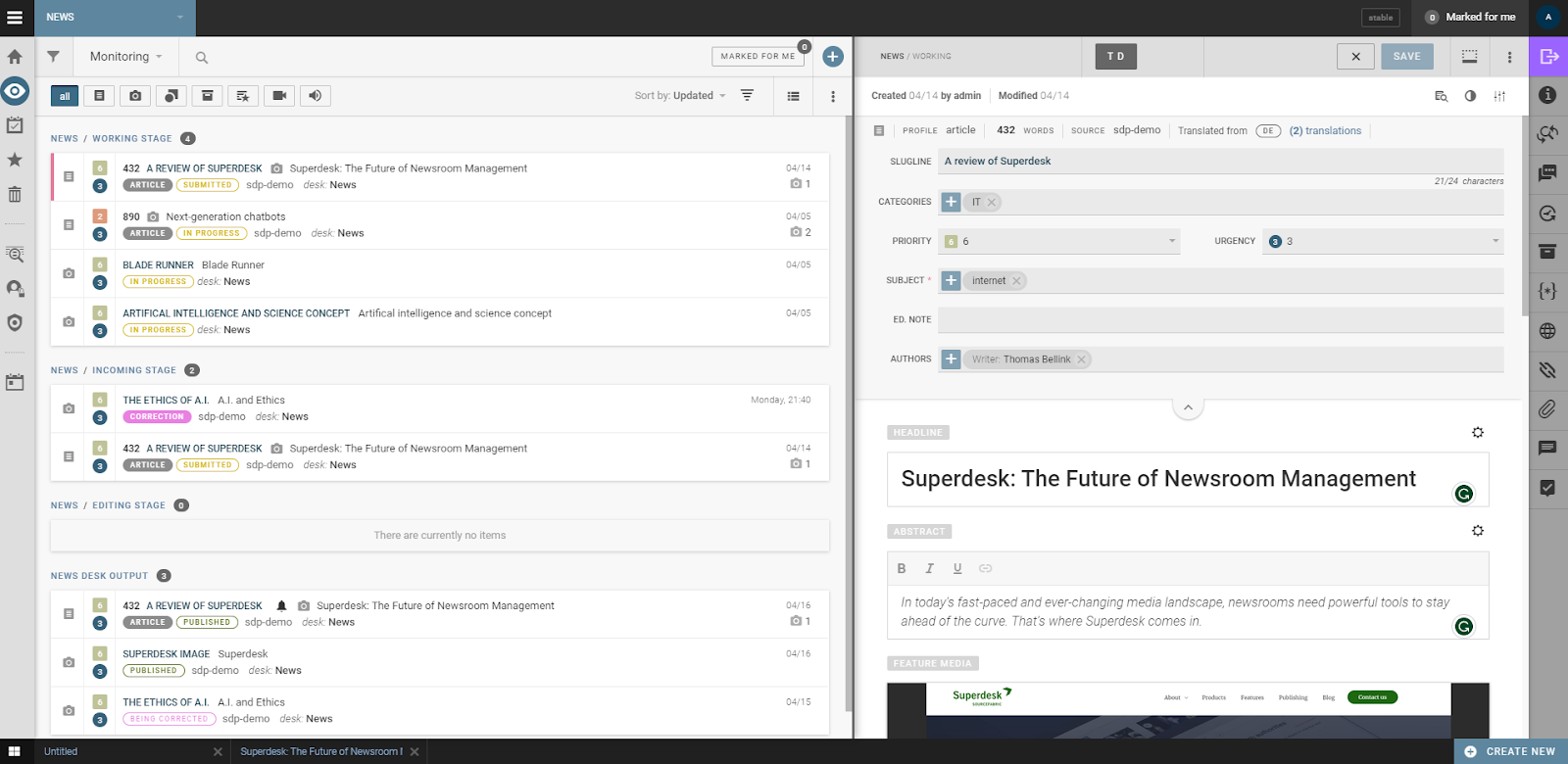
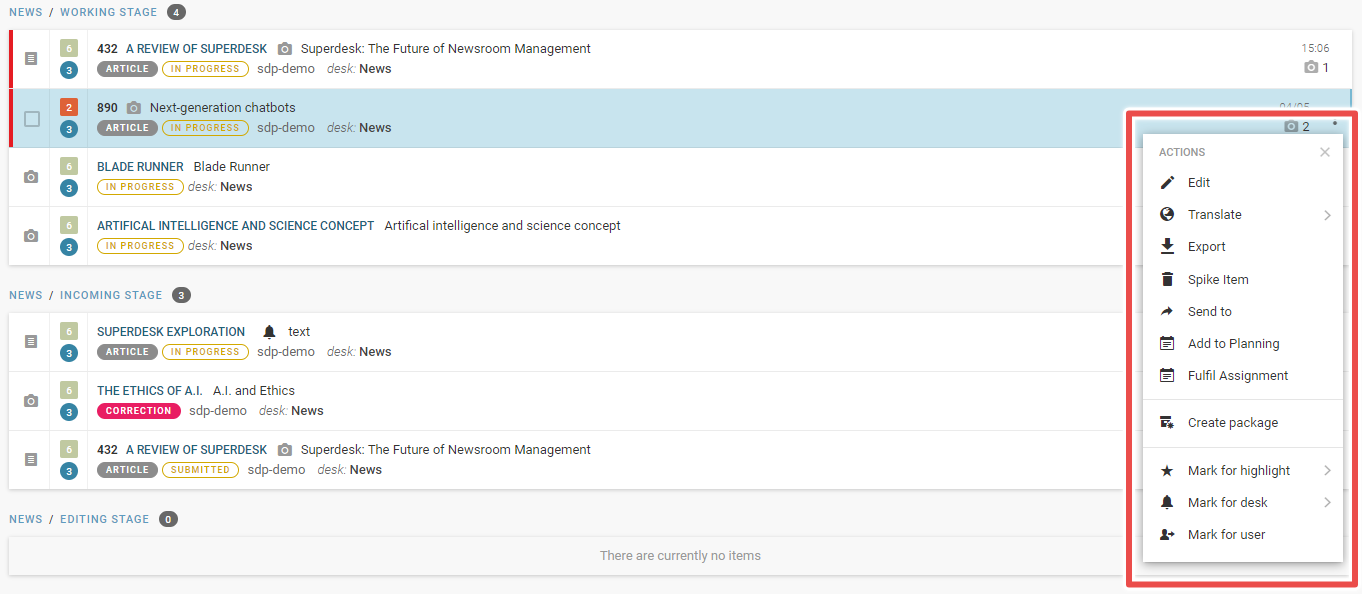
Editors can create new articles using the plus sign in the top right corner of the Monitoring section. To edit existing projects simply click on its three dot menu and select the required function.
As a quick tip, editors can focus on just the text editor by hitting the Monitoring tab icon on the left-hand menu to collapse the pane. They can also adjust the size of individual windows by dragging the sides.
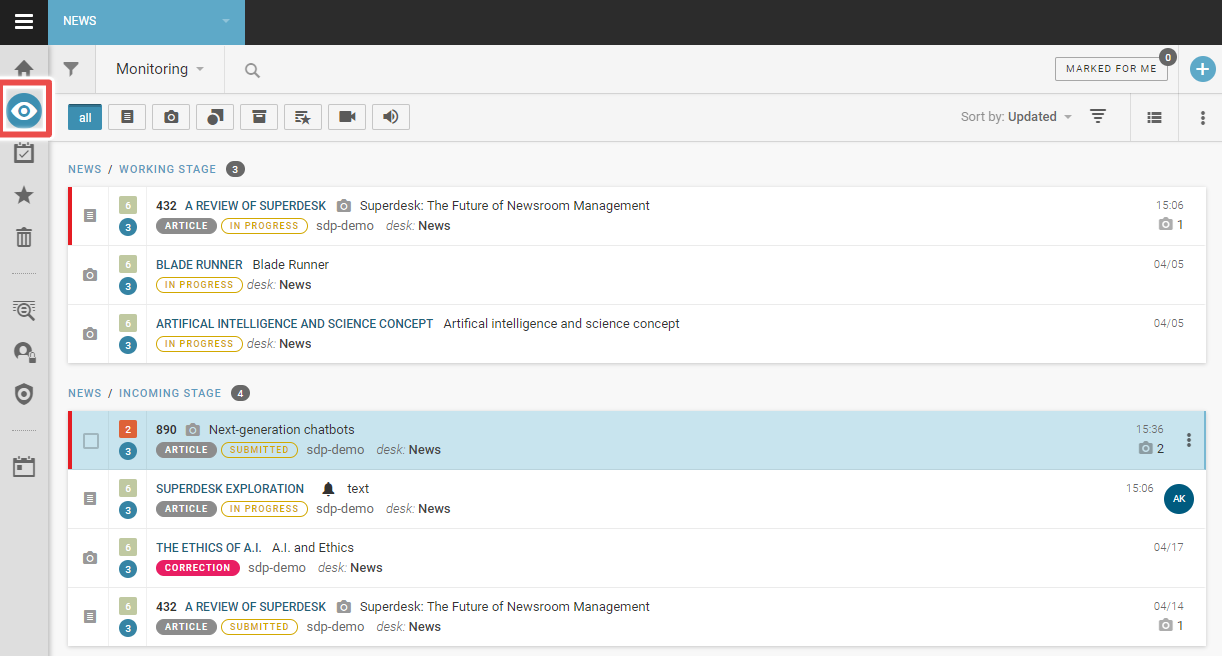
While the option to collapse the window is definitely a useful feature, we found its design to be a little obtuse. Unlike the "close" button on the project window, it's not immediately clear to the user how they're supposed to close the Monitoring panel, or even that this is a possibility.
In fact, there are a number of design decisions that don't particularly serve the user experience; the text editor's toolbar is one such case. Some of the text editor's most important and useful tools — including the button to send content to the publishing or working stages — are found in the right-hand sidebar.
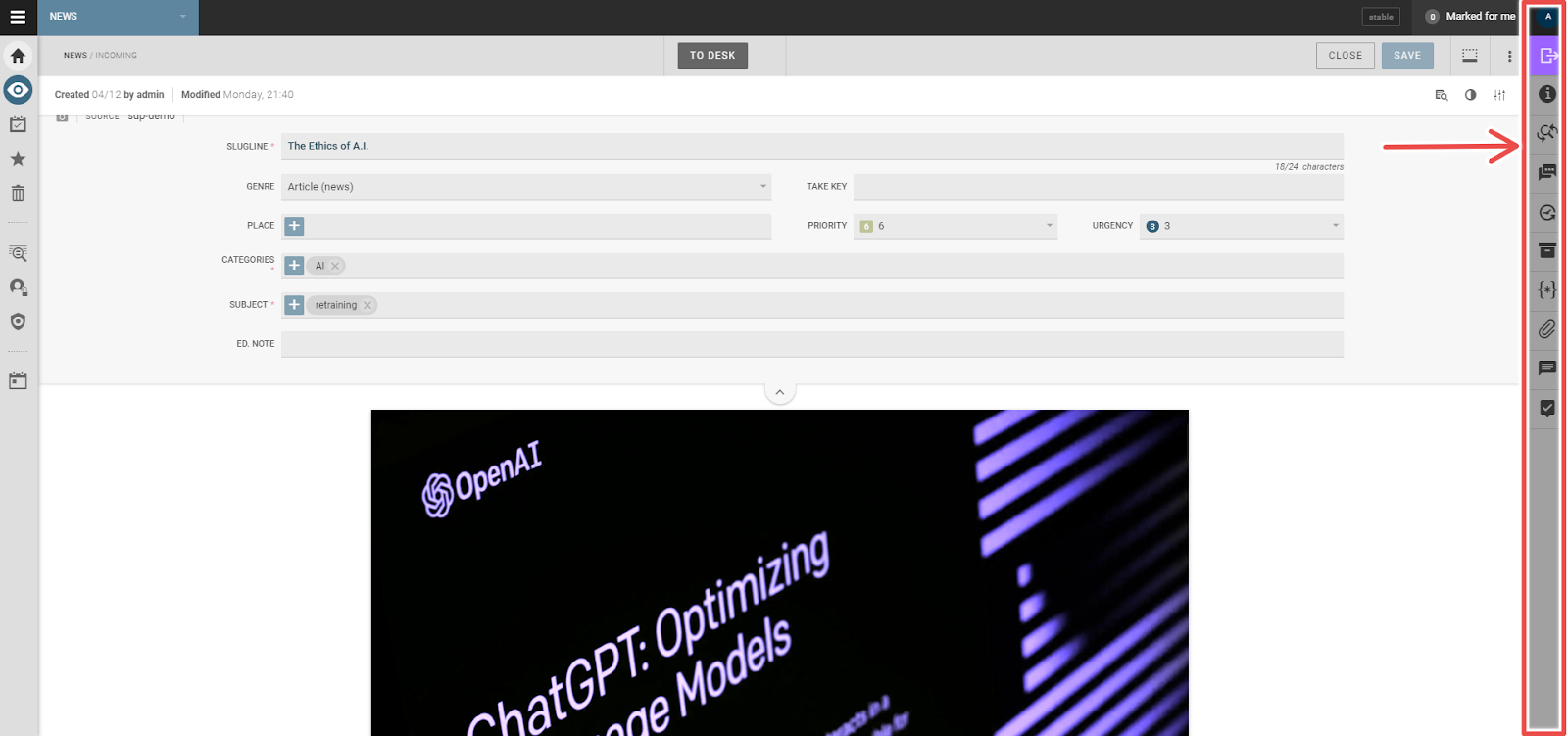
We have a couple of small gripes with this sidebar: its coloring and position.
The sidebar's darkened gray tone means it blends into the background, and subconsciously suggests that it can't be interacted with — that it's "grayed out". Its parallel positioning to the left sidebar, meanwhile, suggests that both are used for similar purposes, which isn't the case. There's a reason the most popular general text editors have their toolbars in an upper ribbon.
In the end, though, we'll admit these are small gripes when contrasted against the text editor's impressive range of tools.
These tools include, for example, a basic image editor that is more in-depth and efficient than most other integrated solutions. The image editor can automatically crop to the most important part of the image and has tools to add image metadata in-program.
The text editor can also embed other forms of rich media including video and audio. Moreover, it features inbuilt comment features, with options ranging from in-line commenting to tagging other editors.
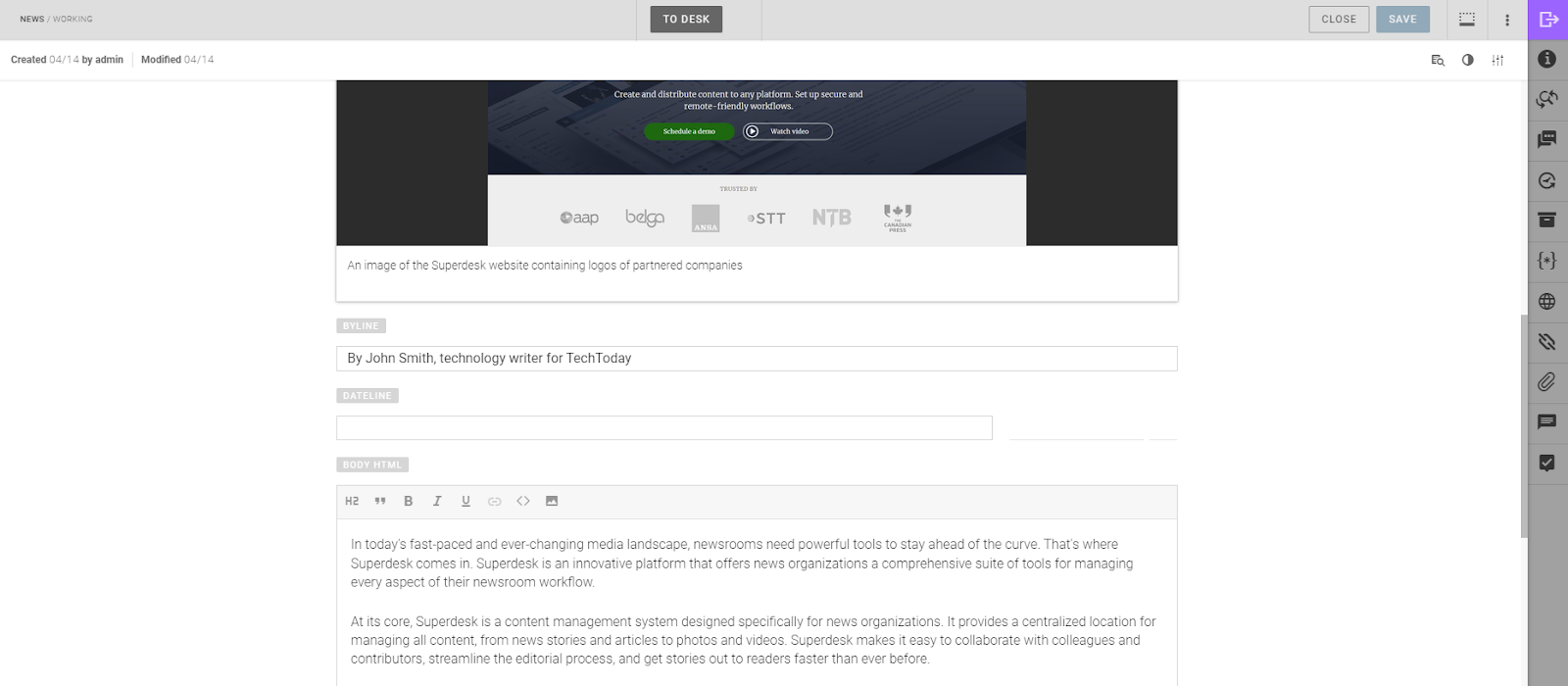
While both the text editor and personal dashboard are well-crafted, in-depth tools with a great deal of capability, when compared to well known dedicated text editors, Superdesk lacks some of their depth.
This is hardly surprising, given that the likes of Microsoft Word or Google Docs are designed purely for text editing rather than Superdesk's broader approach to news publishing. However, we cannot deny that Superdesk lacks some of the keyboard shortcuts available in Word or Docs, which improves their functionality and efficiency.
As such, we're not convinced that Superdesk is where the actual writing or initial edits should be conducted.
We've written an extensive guide to mouseless editing that leverages many of the available navigation and control shortcuts for Google Docs and, to a lesser extent, Microsoft Word to speed up the content creation and editing process.
One basic navigation convention, using the Ctrl + arrow keys to navigate to the start of hard returns, didn't translate seamlessly to Superdesk. Using the image below as an example, we wanted to navigate to the start of the paragraph above the text cursor (or caret). We'd expect that Ctrl + up arrow would achieve this, but in Superdesk that command moves the cursor to the start of the line above.

This is admittedly a small issue, but it does speak to the convenience of using a dedicated text editor.
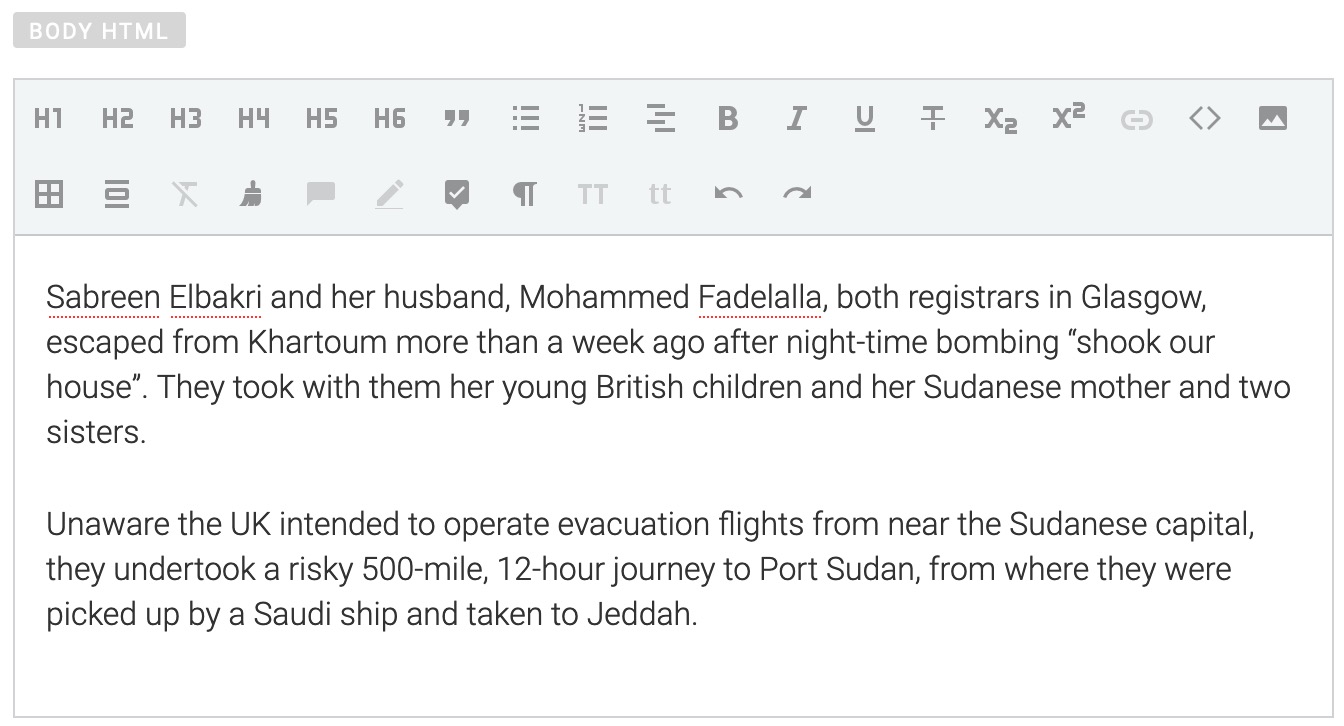
Another issue we ran into was a lack of formatting options, with the H2 being the only Header format available to us during our hands-on with the platform. When asked about this, the Superdesk team explained that the extra formatting options weren't included in our demo. While we can't personally speak to options that we didn't use, have a look at the demo image below for an idea as to the available options.
Superdesk seems better suited to the final stages of content editing and publishing. For example, what we appreciated was the feature that allowed editors to preview how content will appear live, and flag anyone in-program if there's a problem.
So, while we still prefer dedicated text editors for article drafting and initial editing, Superdesk's text editor feels like the next logical step for late stage editing and then publishing.
Next Steps With the Dashboard
Superdesk has a comprehensive features list and it will take any user some time to get to grips with all of them. The top features to master, however, should be the Ingest Sources system and the already mentioned Monitoring section.
These features handle the overall bird's-eye view of operations that take place within the Superdesk platform.
Ingest Sources
In the Superdesk platform, ingesting refers to pulling content from multiple internal and external sources, moving it within the platform and readying it for editing. For example, ingesting can take content sent to a dedicated email and adjust it to a template, which can be useful for organizing freelance content.
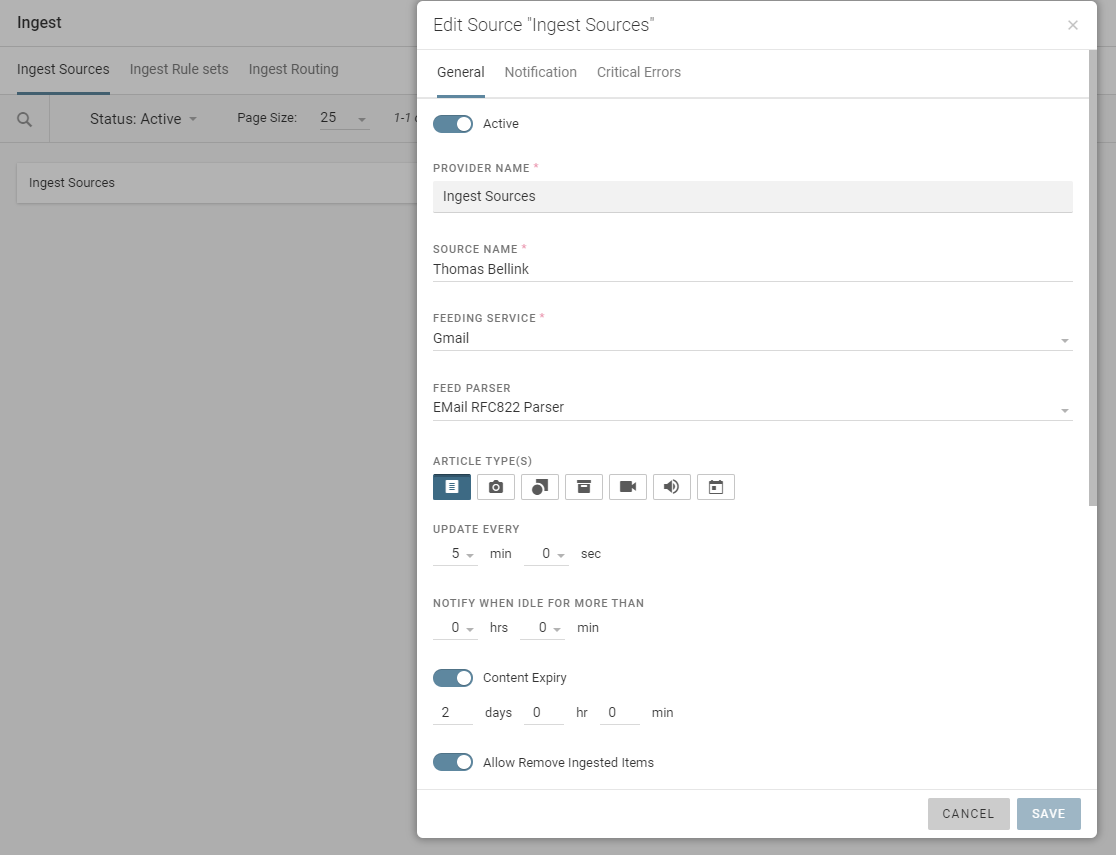
Ingesting can take from multiple types of sources, including:
- Social Media
- RSS feeds
- News wires
However, while we were exploring the platform for the review, we encountered a problem with ingesting content sent to a newly created email. Specifically, the button used to link the email account had a broken Xtml code, preventing us from logging into the Gmail account. Liaising with the Superdesk team revealed that our demo instance had not been configured to work with Gmail, preventing us from exploring this feature.
Monitoring Revisited
As noted above, Monitoring provides an overview of the content production pipeline and can be used for approval process control, such as assigning tasks, using the mark for user feature.
Content can be further organized from desks into different stages of production using the drop-down menu featured below.
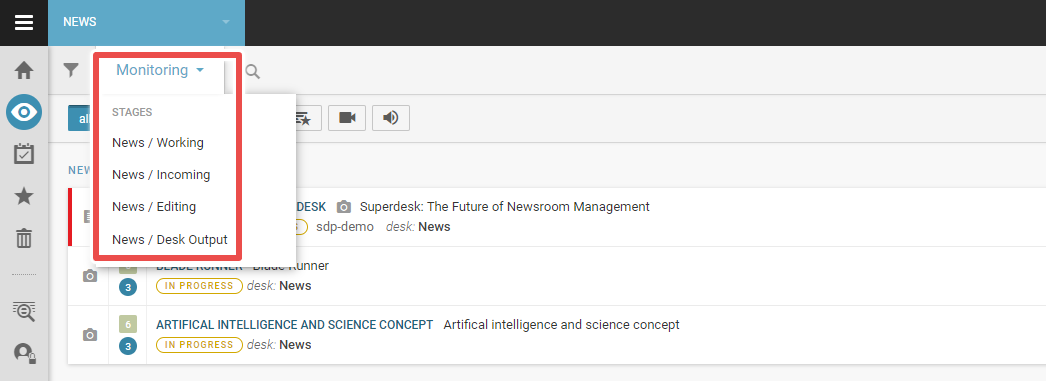
For our demo, four different stages were set up to separate content. The first was the "Working" stage, which starts with article creation and is where the writer can create their first draft. When done, the writer can then submit it to the "Incoming" stage for editing. When editors begin working on a brief, it moves into the "Editing" stage. Finished products are then sent to the "Output" stage where they're scheduled for publication.
While this was the naming convention and order used for our demo, the workflow is completely customizable for each publisher. It can be called anything, and there can be as many desks as a particular workflow requires. The search bar adjacent to the menu can be used to find items across content type, desk and author.
The perspective here can be as narrow or as wide as it needs to be, affording editors many different viewpoints of their content pipeline so they can more quickly identify potential problems areas and organize a solution. It succeeds as a monitoring and workflow tool without being overly complicated.
Templates
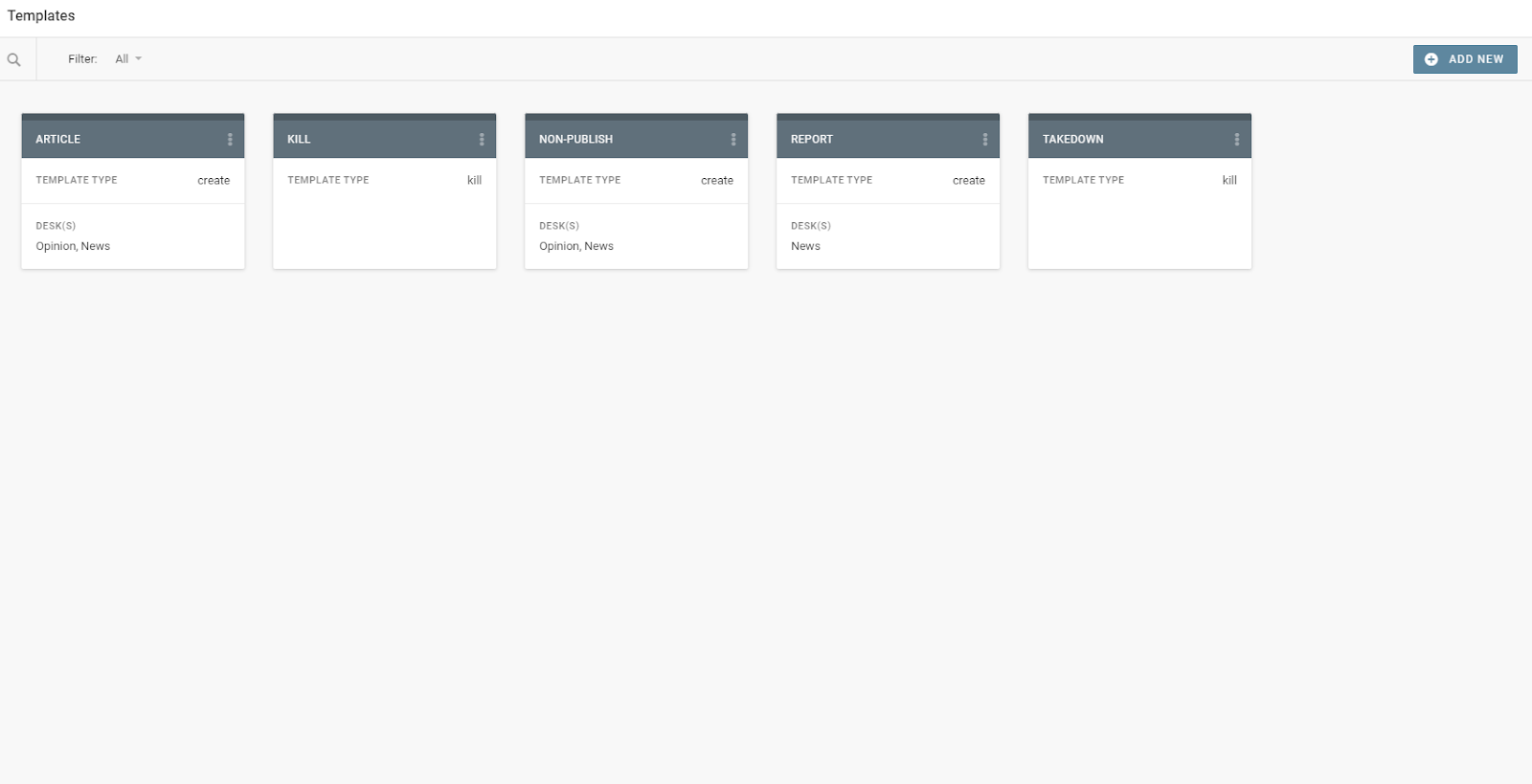
One of the main ways that Superdesk automates the newsroom workflow is through its robust template system. Major content forms — such as news articles, op-eds or updates on a major global index — can be templatized through this feature.
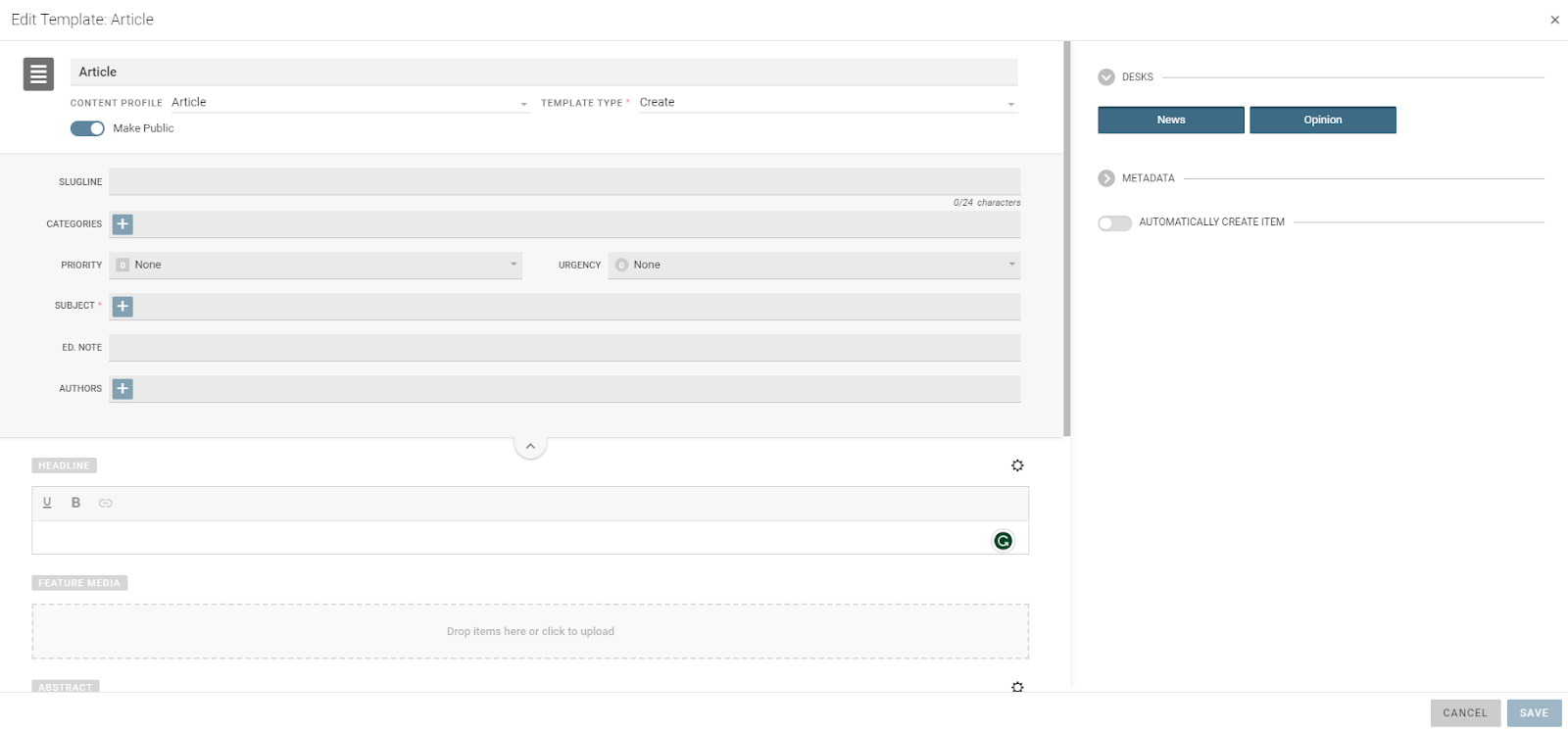
Templates can be edited in a wide range of ways. Headlines can be preconfigured to always appear in a set way and metadata can be adjusted and standardized. Moreover, templates can be sorted across desks, creating an organized and streamlined content generation system.
Other Features
Outside of the main features we've already talked about, we wanted to highlight a few of the platform's other aspects that we felt were noteworthy.
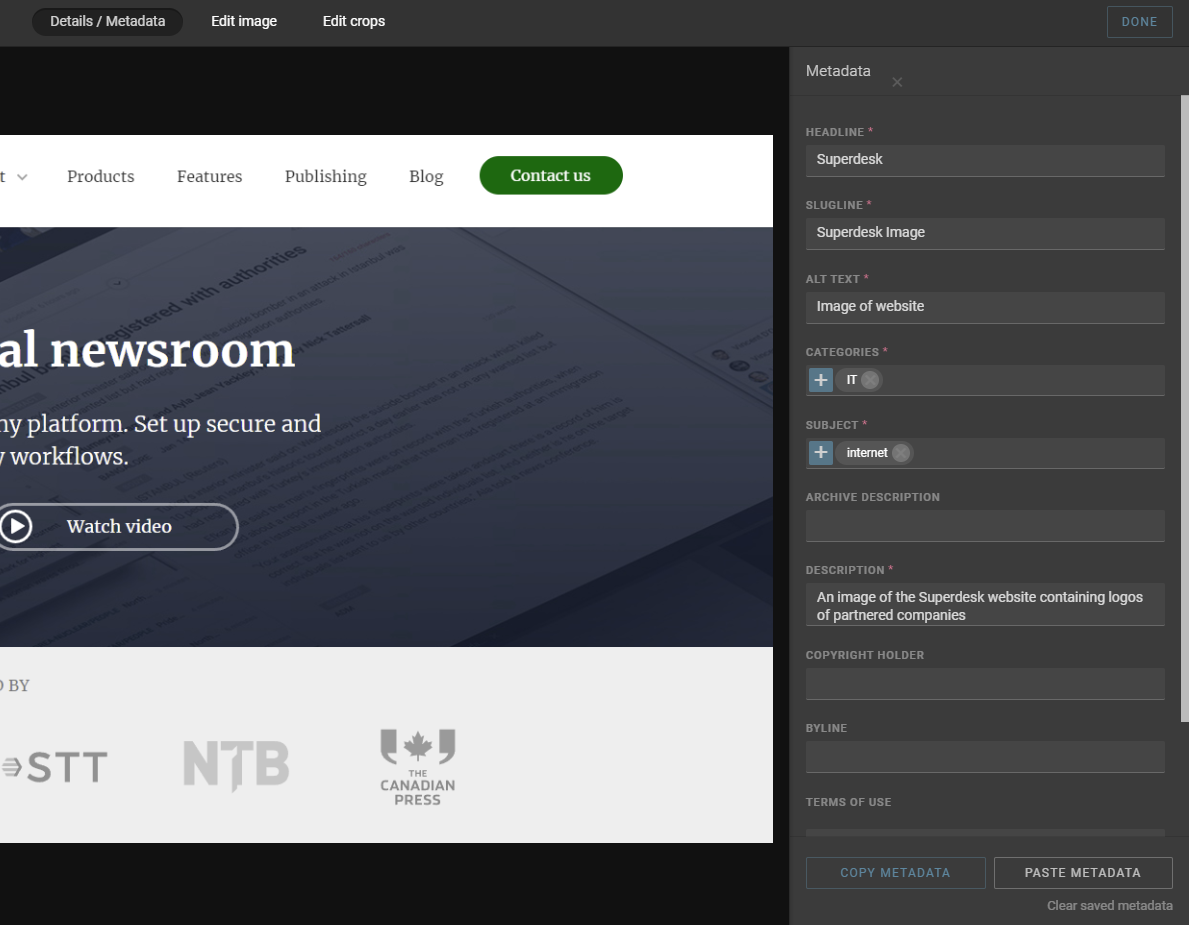
While content has metadata customization built into it, what impressed us was the fact that the program has the ability to copy and paste metadata. This is a small but useful time saver, as it slims down the time spent filling out metadata sheets, needing only small edits instead of a full write-up each time.
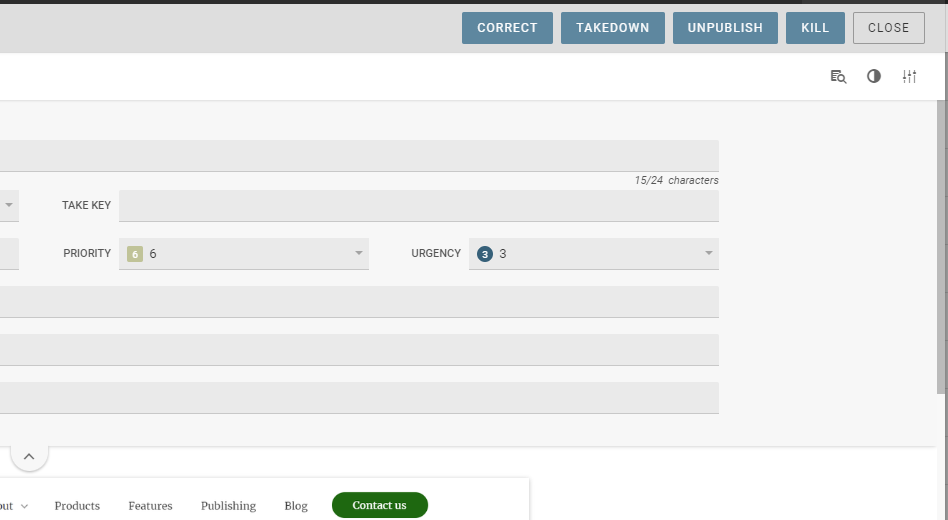
Secondly, the program allows editors to edit content after it goes live. Any content that is corrected after going live becomes highlighted in the monitoring window, which is useful for keeping track of content changes. The program also has an in-built feature to send takedown notices.
Thanks to its API structure and headless CMS functionality, Superdesk can integrate into other legacy systems and third-party applications — including image databases, semantic text analysis programs and other CMSs such as WordPress.
Help and Support
To be frank, Superdesk is a complex program — it's not easy to maneuver around. At any given time, there are at least three different menus within different windows throughout the program.
Luckily, Superdesk has a range of documentation and guides to help onboard users to their platform. One resource that we found helpful when first getting to grips with the platform was their Superdesk guides on YouTube, which detailed some of the basic functions of Superdesk.
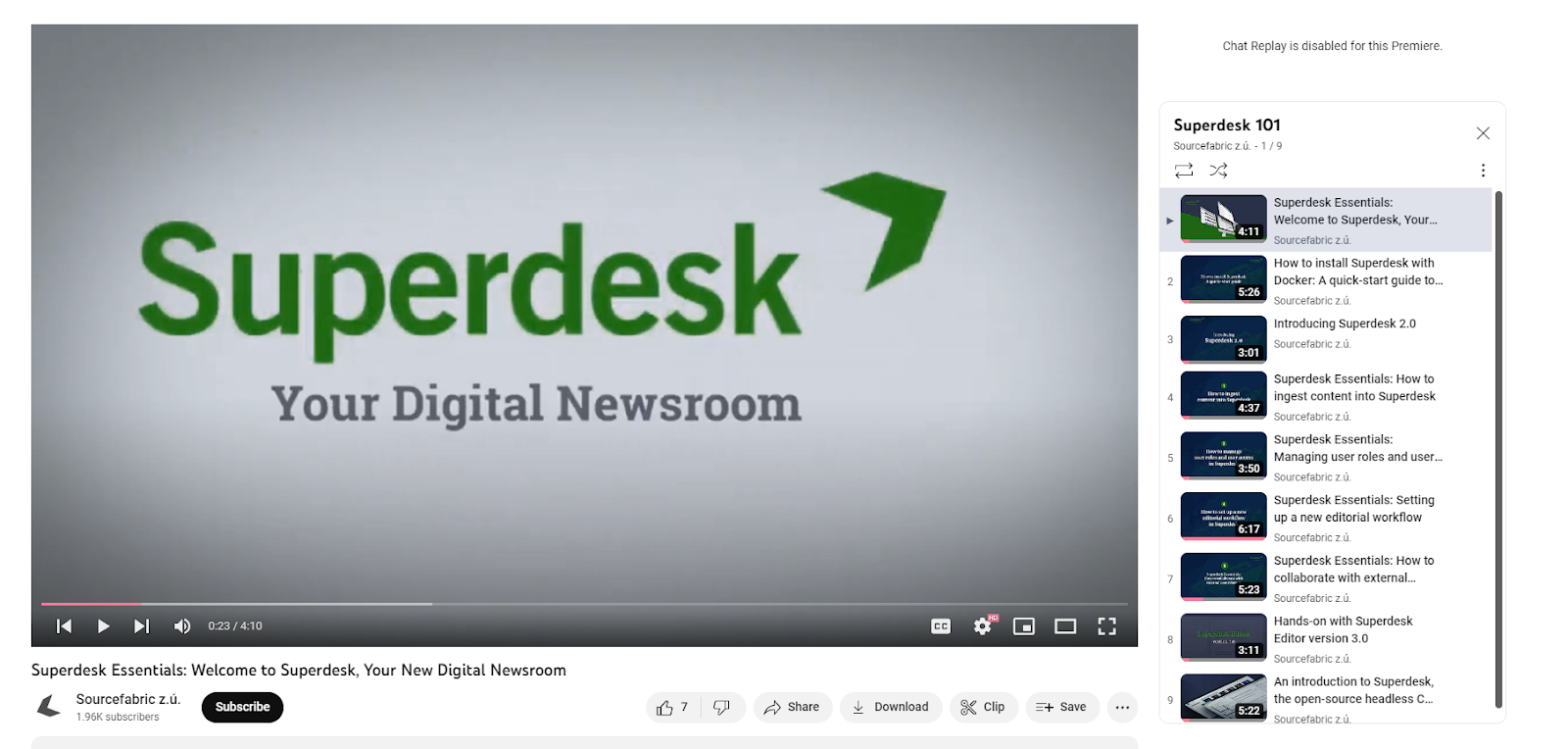
However, if a problem needs an in-depth solution, then Superdesk has offered its complete user manual. There's a great deal of information here, more than 200 pages to be exact, and it's commendable that Sourcefabric has rigorously detailed its features.
More importantly, however, is the fact that when it comes to onboarding first-time users, Superdesk offers live training. This boils down to two hours of training for the Lite version and six hours of training for the Pro version. While direct training will definitely help editors overcome learning hurdles quicker, we do wonder whether two hours is enough for less tech-savvy users. We do feel, however, that six hours should be enough for anybody, regardless of tech level, to comprehend the platform's features and potential.
Finally, each version of Superdesk comes with a dedicated support line, which is definitely a necessity for such a complicated solution. Lite version users have their support restricted to office hours, while Pro and Enterprise versions have extended support hours.
The platform also comes with version control to allow developers to roll back any mistakes in the code.
Superdesk in Review
Overall, Superdesk is an impressive CMS with a lot of potential. It has a strong suite of tools for both journalists and editors and it's particularly effective at monitoring the editorial workflow.
Our suggestions to the platform are two-fold: standardize certain platform elements to provide a more visually coherent workspace and make error messages more visually distinct. Despite some niggles with its design, the platform is a solid digital newsroom solution.
What We Love About Superdesk
- Provides a detailed, yet easily modifiable view of editorial output
- Robust text editor with fully realized media tools
- Easy communication between members using message tools
- Personal dashboard for organizing tasks and document management
- Allows content creators to adjust live content
- Fleshed-out metadata and content strategy tools
- Templatized and stream-lined content creation tools
- Ingesting from feeds and emails
- Strong user performance without much lag
Where There's Room for Improvement
- Somewhat obtuse visual design
- Complicated onboarding process
- Text editor missing some features
Perhaps the biggest draw to the platform, and one of the most critical things that Superdesk does well, is its ability to provide a holistic overview of the editorial workflow and its capacity to work across articles.
Many of its features provide more accessible ways to work across, and keep track of, multiple articles. For example, multiple articles can be opened at once and are displayed in a line at the bottom of the window. Users can also easily swap desks from the top of the window, allowing them to organize content rather efficiently.
The platform's Monitoring window is also useful for keeping track of an entire publication's output at all stages of the process, which in itself can be organized into separate workflows.
Each item is easily identifiable and can be sorted through many different parameters such as author, which makes it an impressive resource for keeping track of an entire editorial platform. In that same vein, it is a great tool for assigning tasks to content creators, both in-house and freelance.
Although there have been some minor issues, the overall user experience of Superdesk has been smooth. While some Superdesk reviews have mentioned occasional platform malfunctions on its initial instance, we never experienced these problems during our demonstration.
Our biggest concern with the platform thus far has been the visual design of the user interface. The platform is definitely busy, and the amount of visual noise can, at times, obscure vital information. Take, for example, the text editor window.
To open this window, users need to navigate to it either through the Dashboard or Monitoring sections. However, the initial windows don't disappear, encroaching on the editing space. There is a way to collapse these windows, but it's not immediately clear how to do so.
The problem with this, as well as similar design decisions, is that the editing window does not operate on this same logic — it has its own dedicated minimize button. It's not a natural design choice and forms a barrier to entry for new users.
Luckily, Sourcefabric does provide plenty of resources to help onboard its users and, once the growing pains have subsided, the platform proves itself to be a robust, streamlined CMS.
All in all, Superdesk has impressed us with its functionality and, despite some kinks, it has demonstrated its comprehensiveness and effectiveness as a digital newsroom.
Score breakdown
4.1 = 0.45 × 3.80 capability + 0.40 × 4.90 publisher fit + 0.15 × 2.80 cost
Σ (criterion rating × weight) across 10 criteria · scale 1 (poor) → 5 (excellent)
The platform provides professional-grade tools including wire feed ingestion, complex story planning, and real-time collaborative editing designed specifically for news agencies.
14% of capability · What we check: Drafting, editing, approvals, roles and simultaneous editing for a newsroom.
The asynchronous backend is architected to handle the high-volume, real-time data loads typical of national newsrooms and wire services.
12% of capability · What we check: Caching, CDN and architecture that hold up during breaking-news spikes.
Superdesk Publisher includes a social/SEO metadata component, and its themes ship static, dynamic and Google News sitemaps plus AMP. Schema and Core Web Vitals are left to whoever builds the front end.
12% of capability · What we check: Schema markup, news sitemaps, canonical control and Core Web Vitals performance.
It offers superior support for industry-standard editorial formats like NewsML-G2 and ninjs alongside integrated media asset management.
10% of capability · What we check: Live blogs, galleries, video and custom content types.
The platform lacks native ad server or paywall functionality, requiring external third-party integrations to manage monetization.
10% of capability · What we check: Built-in or native integration with ads, paywalls and newsletters.
Its headless, API-first architecture is purpose-built to distribute content simultaneously across web, print, mobile, and social channels.
10% of capability · What we check: APIs, apps, syndication feeds and headless front ends.
The open-source, modular design allows for extensive customization, though connecting to legacy systems often requires dedicated technical effort.
10% of capability · What we check: Plugins, webhooks and APIs to connect the rest of the stack.
Sourcefabric says it is building a new generation of native AI capabilities for Superdesk; today AI depends on integrations rather than shipped native features.
8% of capability · What we check: Auto-tagging, summaries, translation and other newsroom automation.
It demonstrates high operational reliability for national broadcasters, though specific security certification documentation is not explicitly detailed.
8% of capability · What we check: Uptime record, security certifications, access control and GDPR tooling.
While highly flexible, the platform's advanced nature requires significant technical expertise for initial implementation and archive migration.
6% of capability · What we check: Tools and services to migrate archives and go live.
Superdesk scores 4.1/5 in Benchmark Grid's independent Best CMS Platforms for News Sites benchmark (benchmarkgrid.com/best-cms-platforms-for-news-sites/superdesk, verified Oct 19, 2026)
Strengths & limitations
Strengths
- Modern, clean, and easily modifiable interface
- Flexible and scalable for large news organizations
- Supports complex newsroom workflows
- Open-source platform with an active community
Limitations
- Requires technical expertise for implementation
- UI needs to be more advanced
- Possibly feature-heavy for small newsrooms
- Integration with legacy systems may require customization
Who uses it
Detected from site code, ads.txt records and published case studies — not from the vendor's own customer list. 5 confirmed, 4 seen in a single source.
By publisher size
By content vertical
Publishers running Superdesk9
- NTBEnterprise· News
- Australian Associated PressMid-market· News
- Australian Associated PressMid-market· News
- BelgaMid-market· News
- The Canadian PressMid-market· News
- ANSAEnterprise· News· reported
- STTMid-market· News· reported
- Brasil 247SMB· News· reported
- National Catholic RegisterSMB· Religion & Spirituality· reported
Cost of ownership
Pricing
Open-source (free to self-host); paid managed plans start from €250/mo; custom enterprise pricing available.
Headline terms
- Model
- custom quote
- Starts at
- $1104.09/mo
- Free tier
- Yes
Estimated 3-year total of $39,747 including the base subscription, one-time fees and recurring extras. It does not include custom integrations or professional services not listed above.
Pricing unclear for your setup? — we'll make the introduction. Free, and it never affects the score.
Cost data sourced from vendor pricing pages and community signals. Vendors may dispute any factor.
What users say
Users praise streamlined workflows and configurability; common complaints: initial setup complexity, training required.
Sources: G2 53% · Trade press 16% · Reddit 11% · X 11% · Capterra 5%
Most discussed
Recent quotes
"This software connects the third party with the legacy."
Positive·G2·4y ago
"Superdesk Software Review 2026: Features, Reviews, Integrations, Pros & Cons 5.0 (2)"
Positive·Capterra·3mo ago
"Sourcefabric built GEN Live Desk using code from Superdesk, Sourcefabric's open source newsroom management software due out later this year."
Positive·Trade press
"@CanadaLJI was launched in late 2019 to bolster news coverage in the country's news deserts using @Sourcefabric's Superdesk Newshub portal."
Positive·X·via Local Journalism Initiative
"Assists with determining which topics are most timely."
Positive·G2·4y ago
19 mentions from 6 independent sources, each read and scored by our analyser. Mentions we could not tie to a real user, and those flagged as promotional, are excluded. Sentiment is opinion, and is independent of the verified publisher adoptions shown above.
Compare Superdesk
The head-to-heads publishers look at most, then the closest contests in the same benchmark.
FAQ
How is Superdesk scored?
Superdesk scores 4.1 out of 5 in Benchmark Grid's independent Best CMS Platforms for News Sites benchmark. The overall figure blends capability (45%), publisher fit (40%) and cost of ownership (15%). Capability is itself a weighted average of 10 criteria; the heaviest are editorial workflow & newsroom collaboration (14%), performance & scale under traffic spikes (12%) and seo & structured data (12%). Vendors cannot pay for a score.
What size publisher is Superdesk built for?
Superdesk is built for mid-market publishers and enterprise publishers. That is the vendor's own stated target, and it is one of the inputs to our publisher-fit score — a platform that suits a national newsroom often carries more operational load than a small one can absorb.
What does Superdesk cost?
Open-source (free to self-host); paid managed plans start from €250/mo; custom enterprise pricing available. Our cost-of-ownership score is 2.8/5, which weighs pricing transparency, entry cost, implementation cost, hidden-fee risk and ongoing cost. Ask the vendor for a written first-year figure that includes implementation before you commit.
Who uses Superdesk?
We have evidenced 9 publishers running Superdesk. Adoptions are detected from site code, ads.txt records and published case studies rather than taken from the vendor's own customer list, and each one is listed on this page.
Can Superdesk pay for a better score?
No. Scores come from our editorial review of the product's documentation, demos and public evidence. A vendor can claim this listing or request a re-review, but nothing they buy changes a score or a position.
Verify a claim
Enter a claim about Superdesk and our AI will check it against the benchmark data on this page. Claims we have already fact-checked are listed below.
3 verifications remaining
