Taption
AI-powered transcription and translation platform optimized for high-speed video localization and CJK languages.
Best for small and mid-market publishers.
Hands-on review, commissioned by the vendor · Last verified Oct 19, 2026 · Scored on 10 criteria · Vendors can't pay for scores
Research by Vahe Arabian · Hands-on tested by Kamalpreet Singh · Scored and edited by the SODP team
Key facts
- Score
- 2.9 / 5
- Tier
- Marginal Fit
- Pricing model
- Free tier; Premium $12/month for 120 mi…
- Type
- Transcription
- Hosting
- SaaS
- Founded
- 2020
- Headcount
- 2
At a glance
- Taption scores 2.9/5 (Marginal Fit) in Benchmark Grid's independent transcription software benchmark, assessed on 10 published criteria.
- It is built for small and mid-market publishers.
- Strongest on Turnaround & real-time (4.6) and Editing & verification workflow (4.3); weakest on Security & data retention (2.2).
- Pricing: Free tier; Premium $12/month for 120 minutes. (vendor pricing page, verified 2026-08-06).
- Scores last verified 19 Oct 2026. Vendors cannot pay for a score or a position.
Summary
Editor's update, July 2026: 19 Oct 2026 accuracy audit: integrations 2.8->3.3 (API access included on Bulk plan).
Taption is a video transcription and captioning platform that generates accurate captions from video files with collaborative transcript editing and multi-language subtitle export.
Full review commissioned by the vendor and first published on State of Digital Publishing (2024). The vendor paid for the review, not the result: the Benchmark Grid score is set separately on the published methodology and the review stays up whatever it says.
Taption Review for 2024
Artificial intelligence (AI) has transformed the age-old transcription industry for good. Advanced speech-based natural language processing (NLP) now enables software to transcribe human voice with near human-level accuracy while taking only a fraction of the time of an expert human transcriber.
Traditionally deployed heavily by the legal and medical industry, transcription services have become essential in nearly all spheres of work. Businesses use them for note-taking during virtual meetings, while e-learning platforms rely on them to transcribe lectures and interactive sessions.
Little wonder, then, that the market size of the speech-to-NLP market is projected to grow at a CAGR of 28.61% between 2024 and 2030, by which year, the market will be worth $96.2 billion.
However, there still remains a large gap between promise and delivery. Several AI-based transcription tools available today are either too slow, too inaccurate, or simply don't work as well for non-European languages.
Taption's AI transcription service claims to plug these gaps in the AI transcription space. Join us as we review this tool to see how well it lives up to its promise.
What Is Taption?
Taption is an AI-based transcription tool that converts audio and video files in over 40 languages into editable, searchable, time-stamped text. Its clients include several large news publishers, government institutions, and universities.
Besides transcription, Taption can also translate videos, analyze their content to generate summaries and actionable items, convert audio files to video, and convert existing transcripts into subtitles.
Taption claims an accuracy rate of over 90% for its transcriptions. It works particularly well for Chinese, Japanese and Korean, or the CJK languages, where several other leading transcription tools struggle with accuracy.
Taption's Pricing and Features
Taption comes in three pricing plans — Standard, Premium, and Bulk.
Standard
The Standard version is free once users sign up.
Unlike a few other transcription tools we've used, Taption does not ask for credit card information during the signup process.
We found this to be a helpful feature, as it allows users to get a feel for the platform before deciding whether to pay for the tool.
When users first sign up for the platform, they get 15 minutes of free transcription.
Once users run out of their 15 minutes of transcription time, they can buy more minutes, which are charged at $8/hour.
It also has a maximum file upload limit of 2GB.
Users can access features such as the text editor, the personal AI dictionary, and 3 AI credits for analyzing and summarizing their videos.
Premium
The Premium plan costs $10.8/month if billed annually and $12/month if billed monthly.
It has all the features of the Standard plan, along with additional capabilities such as:
- 120 free monthly minutes of usage, with additional minutes at $6/hour
- Ability to customize font size
- Choosing your preferred file format when downloading a transcript,
- Accepting links as sources when transcribing
- Ability to transcribe multiple files at once
- Ability to edit a video by editing the text
- Up to 5 credits for AI analysis and summaries
Bulk Subscription
The Bulk Subscription costs $62.1/month when billed annually and $69/month when billed monthly. It has all the features of the Premium plan along with additional features handy for enterprises, such as:
- 1,000 free monthly minutes of usage, with additional minutes at $3/hour
- Multi-user access
- User permission management to restrict access to certain features
- Invoices with tax ID numbers and customized titles as they relate to the enterprise
- Up to 30 monthly credits for AI analysis and summaries
Taption also provides custom API integration upon request. This feature is chargeable according to user requirements.
Apart from this, Taption has no other hidden costs. It is also worth mentioning that all files of less than 1-minute duration are free to transcribe.
Compared to other AI-based transcription tools available in the market today, we found Taption to be one of the most affordable options.
Getting Started With Taption's Dashboard
To get started with Taption, users need to visit the home page and click on the Login button in the top right corner.
Signing up is quick and simple. Taption allows users to sign up using their Google account, so there's no need to fill out long forms or enter credit card details.
Once they sign up, the first thing users see is the Taption home screen. On the top right corner, users can view their remaining credits.
To transcribe audio or video files, simply click the Upload button and upload your file.
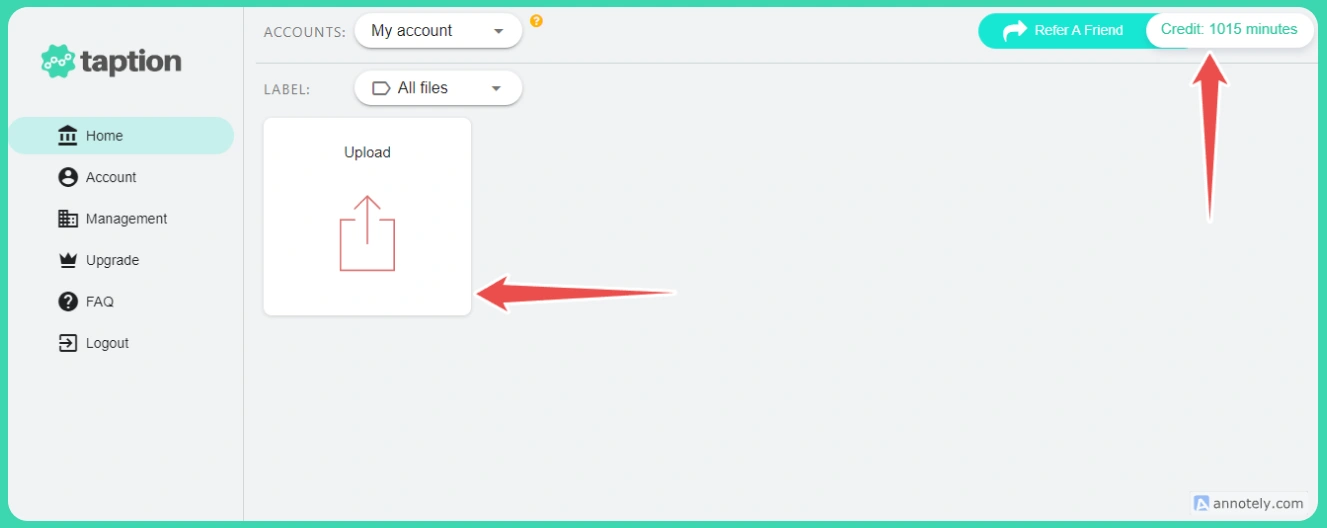
Users can upload their files using any of the several options available. Please note, however, that the standard plan may not allow users to upload using a link.
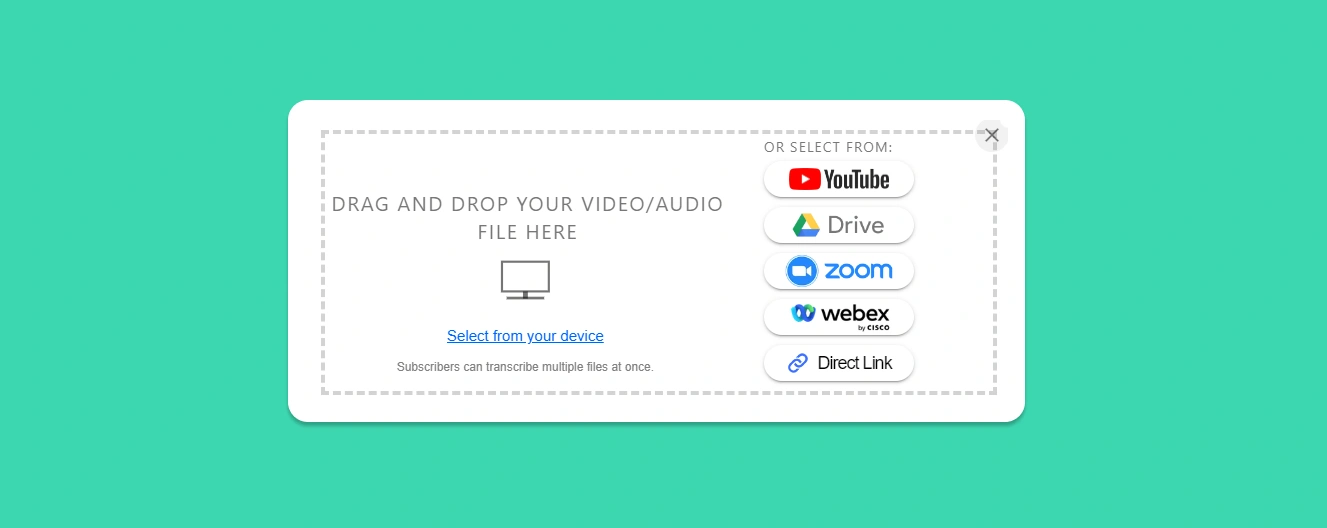
We chose the YouTube option. For premium users, Taption also allows you to transcribe multiple videos at the same time. Simply click the Add button in the dialog box and add the links to all the videos you want to transcribe.
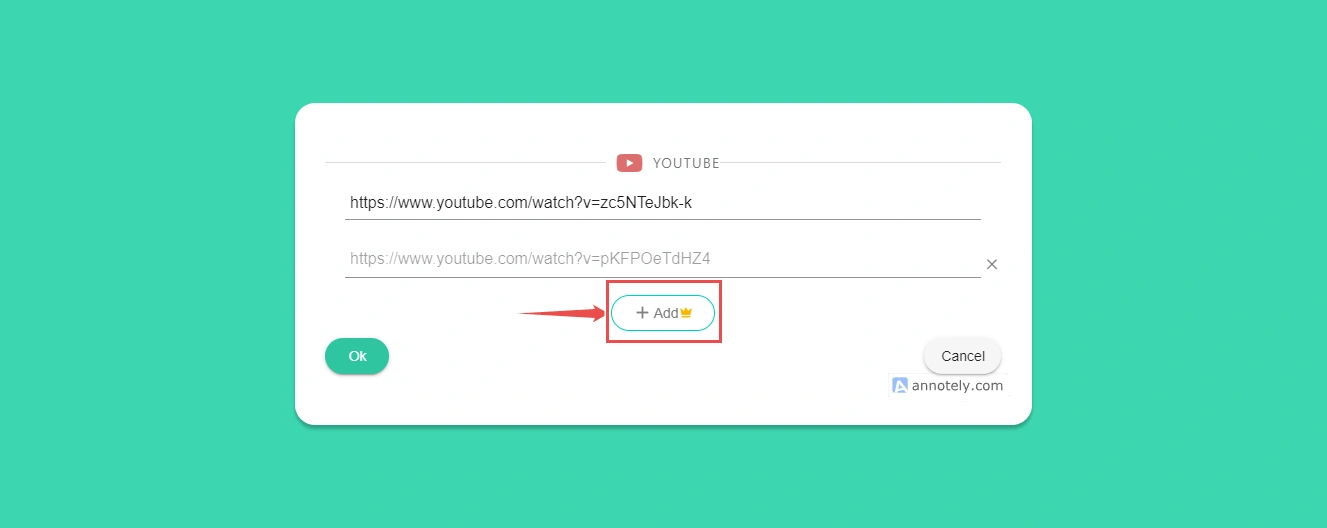
Once you've added all the files you want to transcribe, click the green OK button at the bottom left-hand corner. For this review, we transcribed only one video.
Clicking on OK opens a new dialog box with two dropdown menus. In the first one, users must select the language of the transcript. They can select from any of the 40+ languages that Taption currently supports.
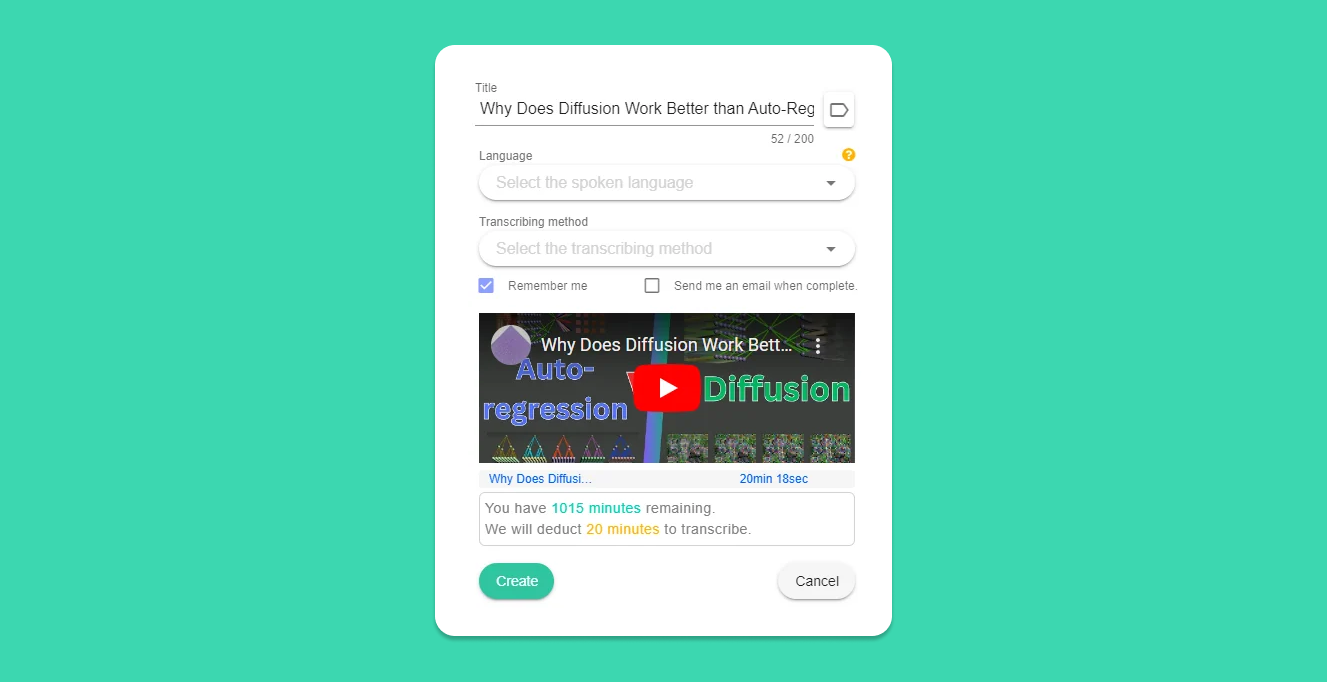
The next drop-down menu requires users to select the transcribing method. Taption offers four transcribing methods:
- Automated Transcription: Taption transcribes the video on autopilot without further input. This is the setting most individual users would likely use.
- Import SRT File: This is the option users would select when they have a subtitle file to go with the video.
- Import Text File: This method suits users who want a text file without time stamps. Taption adds time stamps and speaker labels to the transcript.
- Manual: Selecting Manual simply generates an empty transcript, which users are required to enter manually. We're not quite sure what purpose this option serves.
For this review, we selected the Automated Transcription option. The box then came up with three more fields:
- Select Output Format: This asks the user whether they want the transcript labeled by speaker, broken down by captions/subtitles, or formatted without a specific method.
- Category: This requires the user to specify what type of content the video contains, such as legal, educational, finance, etc. Taption uses this information to improve its transcription accuracy.
- Time Range: This option lets users transcribe only a certain section of the video.
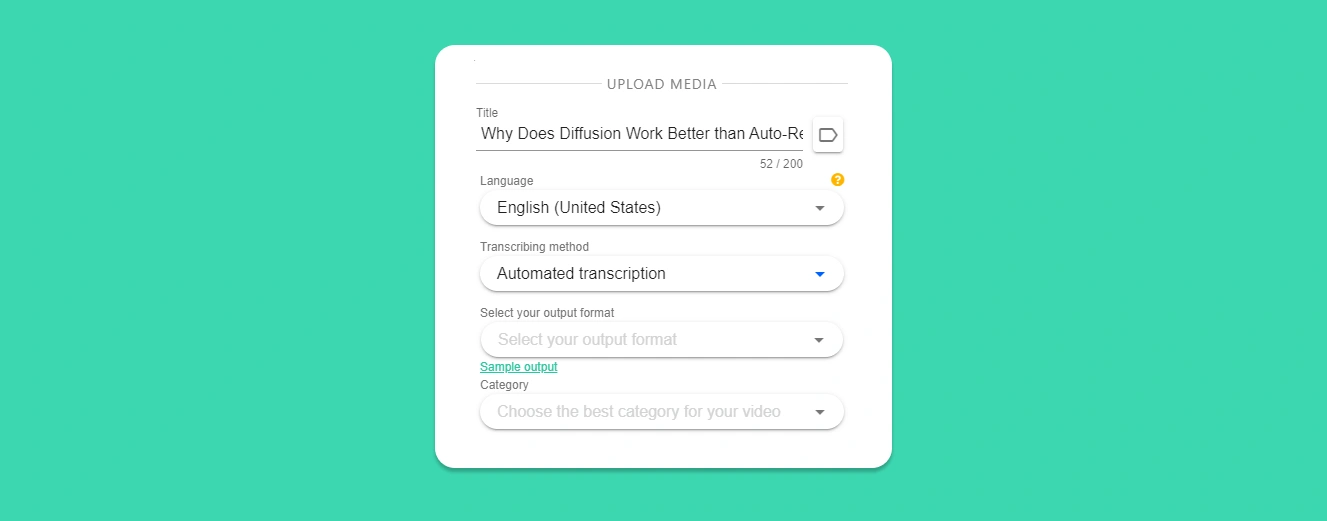
Finally, once all the fields have been filled, hit "Create" to start transcribing.
Although the message on the screen said that Taption takes about as long as the length of the video to complete transcribing, we were pleasantly surprised to see that our 20-minute video was ready within 2 minutes, complete with speaker labeling.
This is fast, even by the standards of the most advanced transcription tools out there.
We also found the transcript to be well over 90% accurate, which is in line with Taption's claims. Please note that if you're using Taption to transcribe live meetings, such as a Zoom call, external factors, such as background noise, could affect the output quality.
Once the transcript is ready, users have the option of translating it into another language, sharing it with other users in their organization, or exporting it in their preferred formats, such as PDF, WebVTT file, MP4 video file, and more.
Next Steps With the Dashboard
Taption has a fairly simple and clean UI, and the dashboard isn't needlessly cluttered. However, this doesn't mean it doesn't come packed with features. Here are a few of the most important ones:
1. AI Analysis
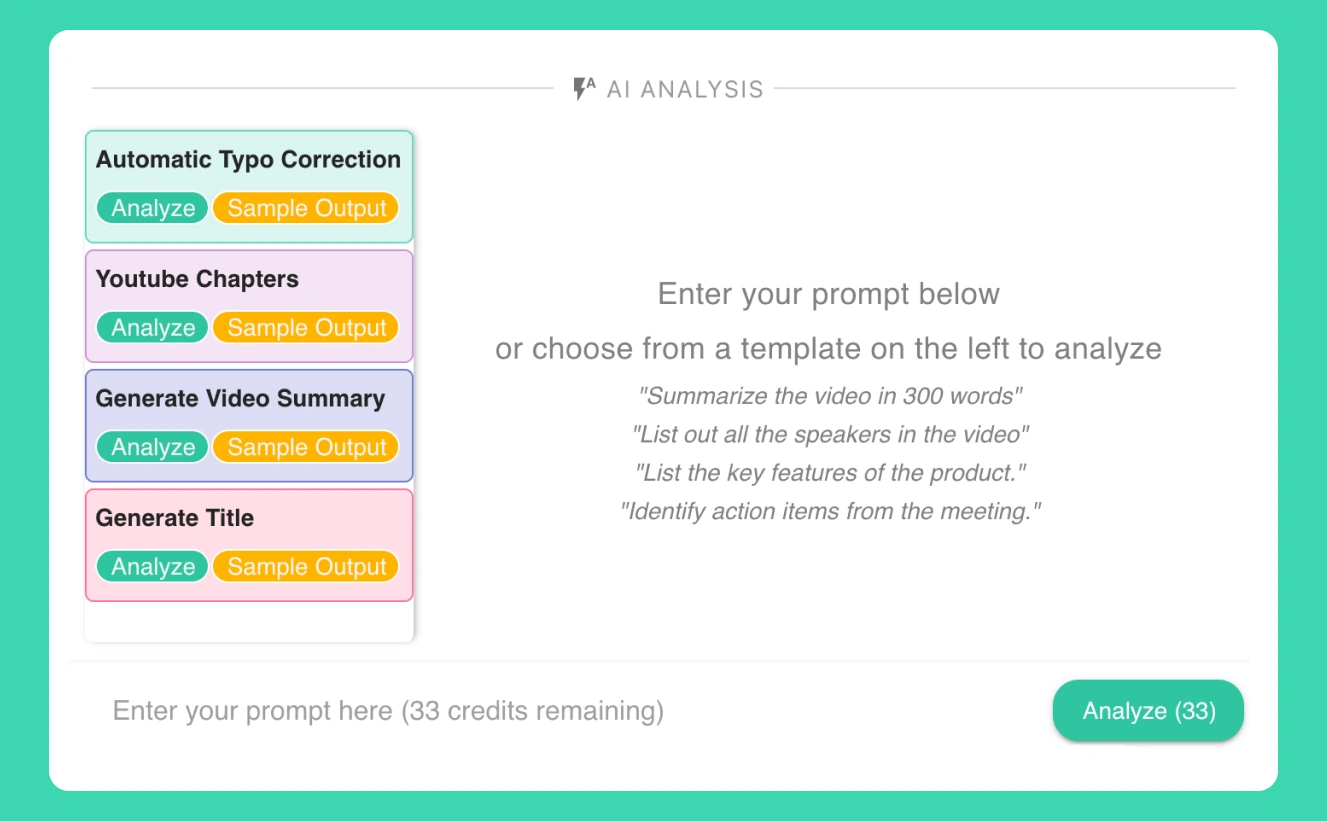
The AI analysis feature can perform various functions, including summarizing and analyzing videos and extracting actionable inputs.
Users need to instruct the AI on what they want using a prompt. The left panel also lists commonly used prompts as templates so users don't have to type a prompt each time.
2. Translate
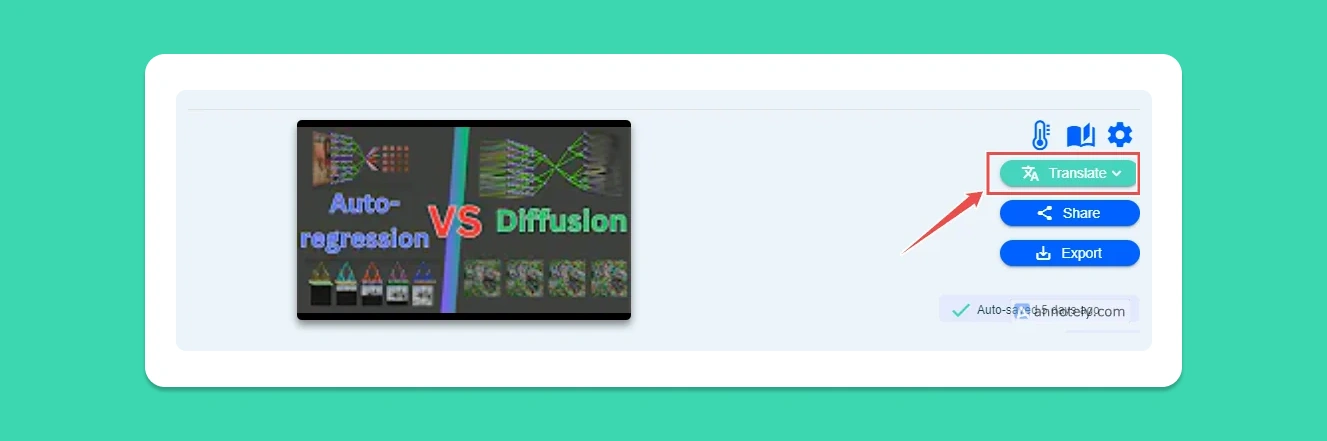
With Taption, you can also translate your transcript into 50+ languages.
Simply navigate to the Translate button on the top right corner and select your preferred language.
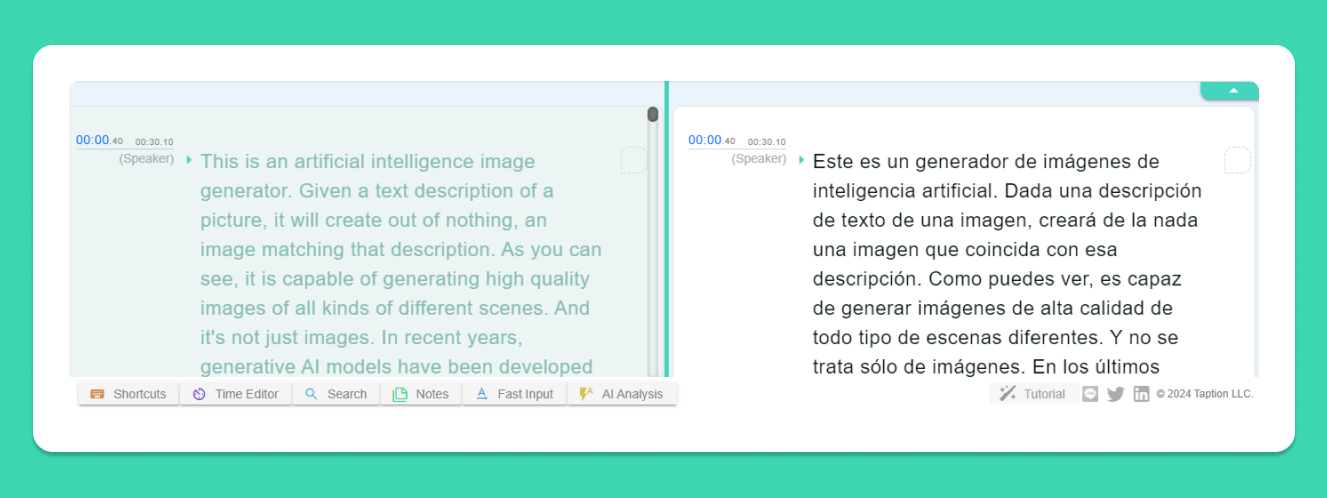
For the purpose of this review, we chose Spanish. Taption translated the entire transcript of our 20-minute video from English to Spanish in less than a minute.
The translated text appears on a split screen, right next to the original transcript, complete with speaker labeling and time stamps.
3. Time Editor
The Time Editor is a powerful feature hidden away in the footer menu. It allows you to edit or crop certain portions of the video itself, while Taption syncs the time stamps for the transcripts.
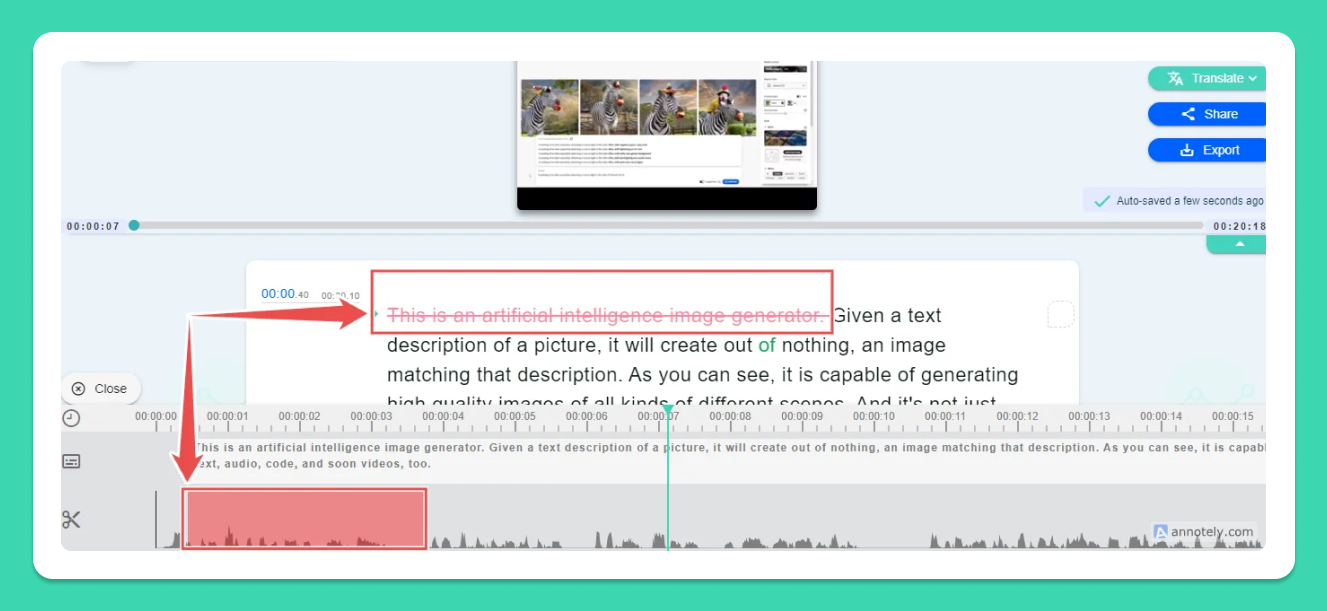
To edit the video, users need to drag their mouse across the waveforms on the bottom of the screen. As you drag your cursor, you will notice the corresponding text getting crossed out in red in the upper panel of the screen.
Now when you play the video again, the cropped out video, and its corresponding text, will no longer be a part of your video and its transcript.
4. Exporting MP4 With Embedded Subtitles
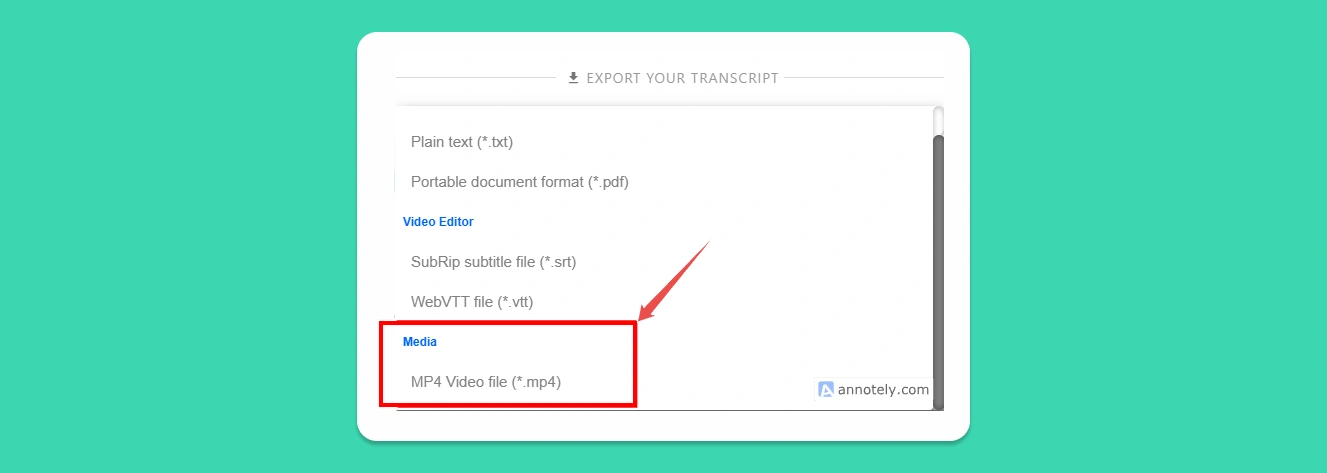
Taption allows users to export their transcribed videos in several formats including MP4. Additionally, when saving the transcribed file as MP4, users can choose to have subtitles embedded in multiple languages. This is a powerful Taption feature that most other tools in the market lack as of now.
To do this, select Export from the top right corner, and from the drop down menu which opens, choose the MP4 Video File option.
Taption then asks you whether you want to embed subtitles. You can choose from any of three options available to split subtitles.
In the Dual Subtitles drop down menu, you can choose the font settings such as font size and font style for each of the two languages you chose for subtitles.
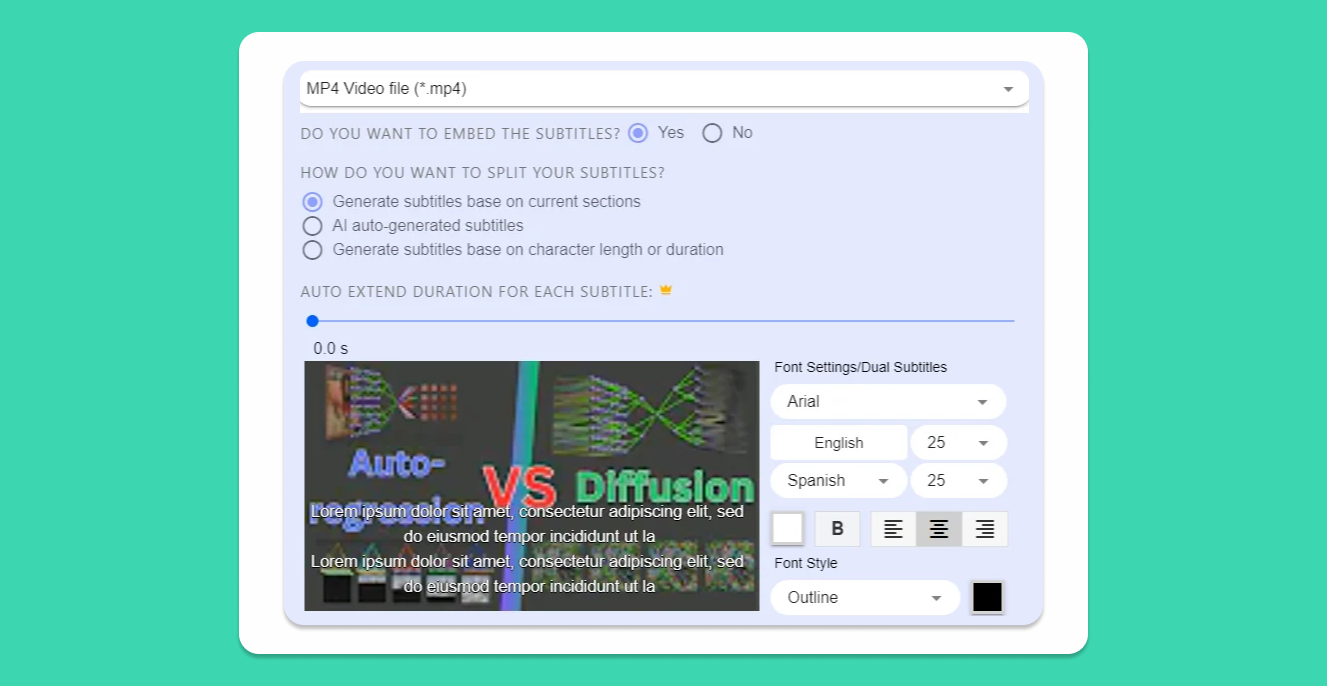
Since in our case, we chose English and Spanish, Taption shows those two options as pre-filled.
5. Export in Custom Format
Although Taption allows transcripts to be exported in a variety of formats, there are times users might want to export in custom formats, such as an XML file. To do this, select .txt or .PDF as the format when exporting, and then select Customized Format.
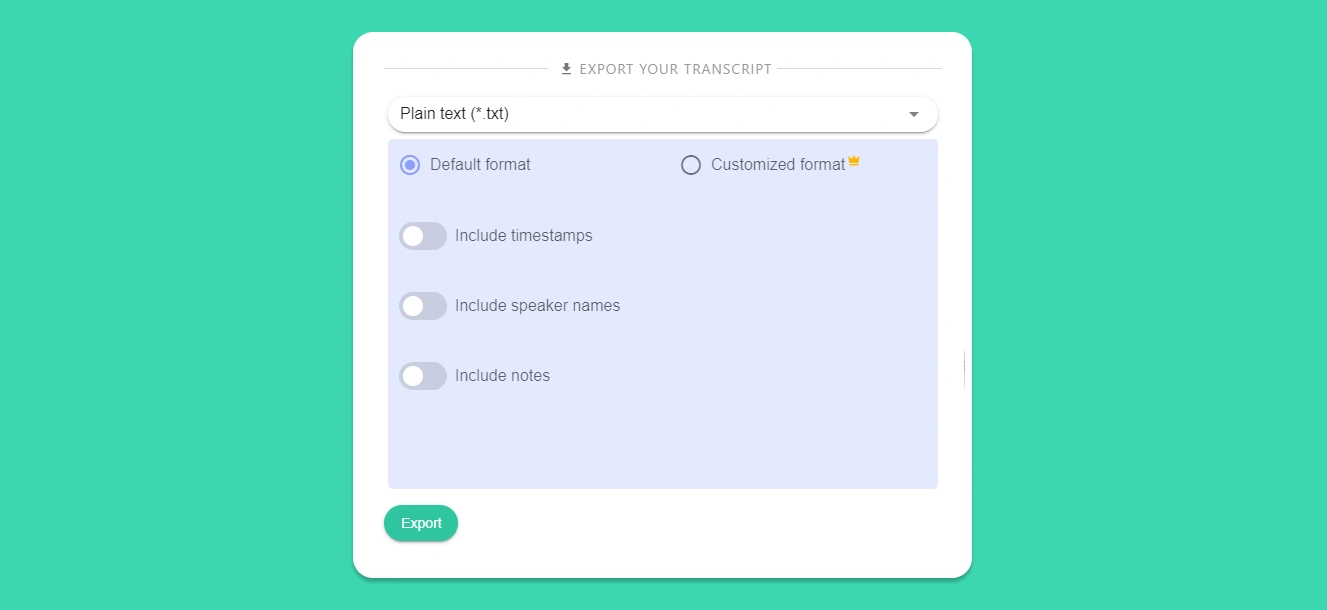
This opens up a new screen where users can define their own custom format for exporting the transcribed file.
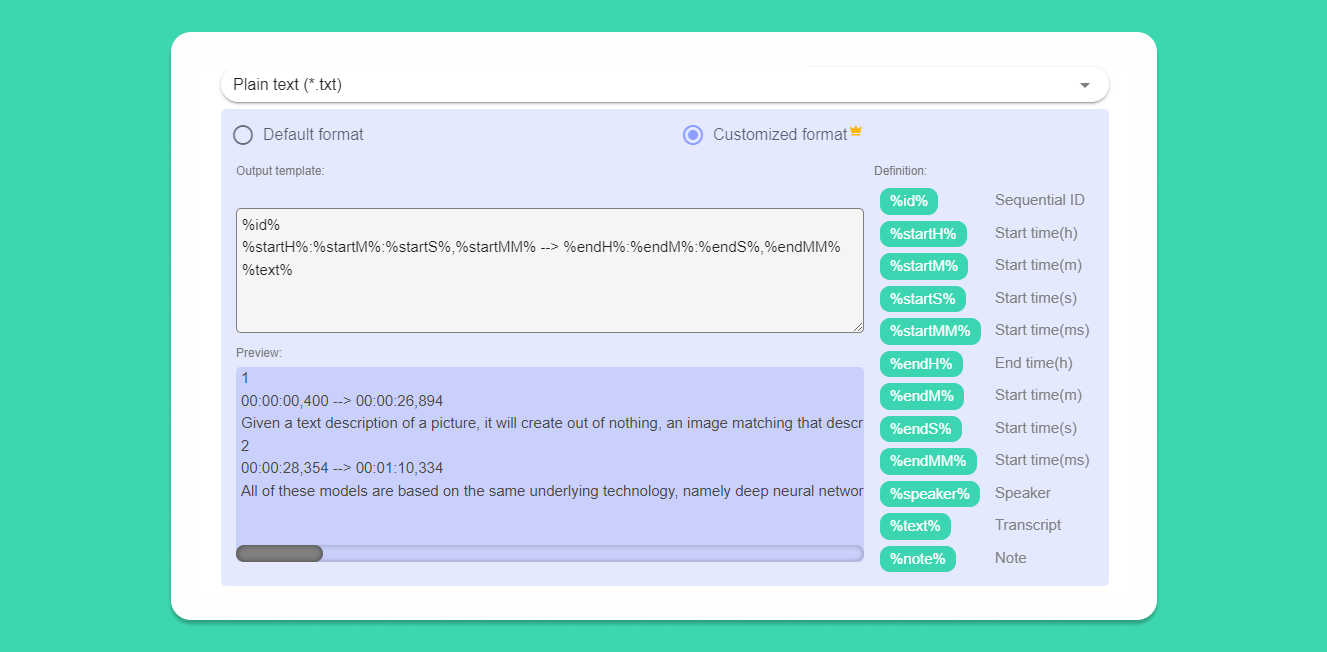
This is another interesting Taption feature that we haven't yet encountered in other transcription tools.
6. Add Notes
Taption allows users to add notes to sections of the transcription. Since we created a speaker-labeled transcription, Taption allows us to add notes to each section spoken by a specific speaker.
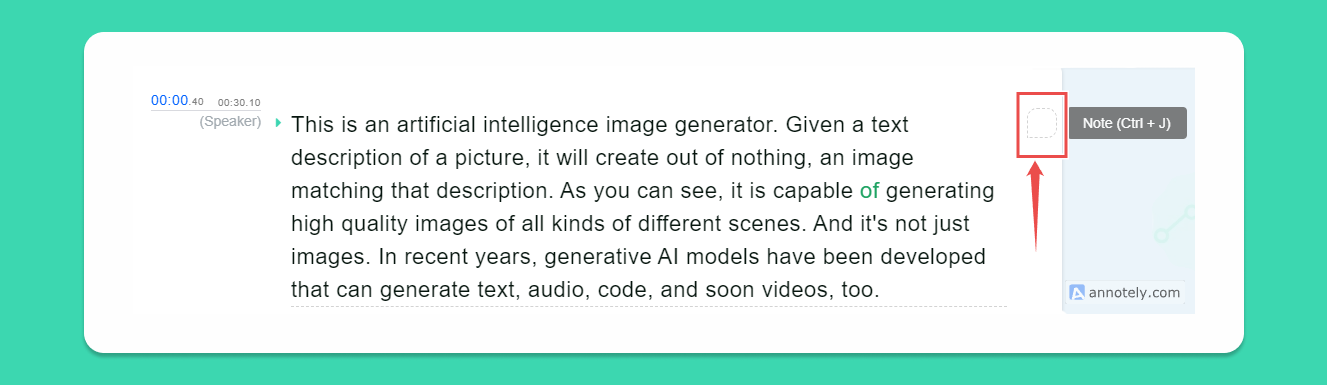
To add a note to a section, simply click on the square box on the text's right side. Taption, however, does not have the capability to tag people within these notes. We've seen this feature in some of the newer AI transcription services in the market, and we hope that the Taption team can consider adding this feature in the future.
7. Fast Input
Right below the editing panel, Taption provides users with a host of options that are easy to miss.
One of the most useful features of this footer menu is Fast Input. This is where you input complex words and phrases that you use often when typing. You can then access them by pressing the function keys while editing.
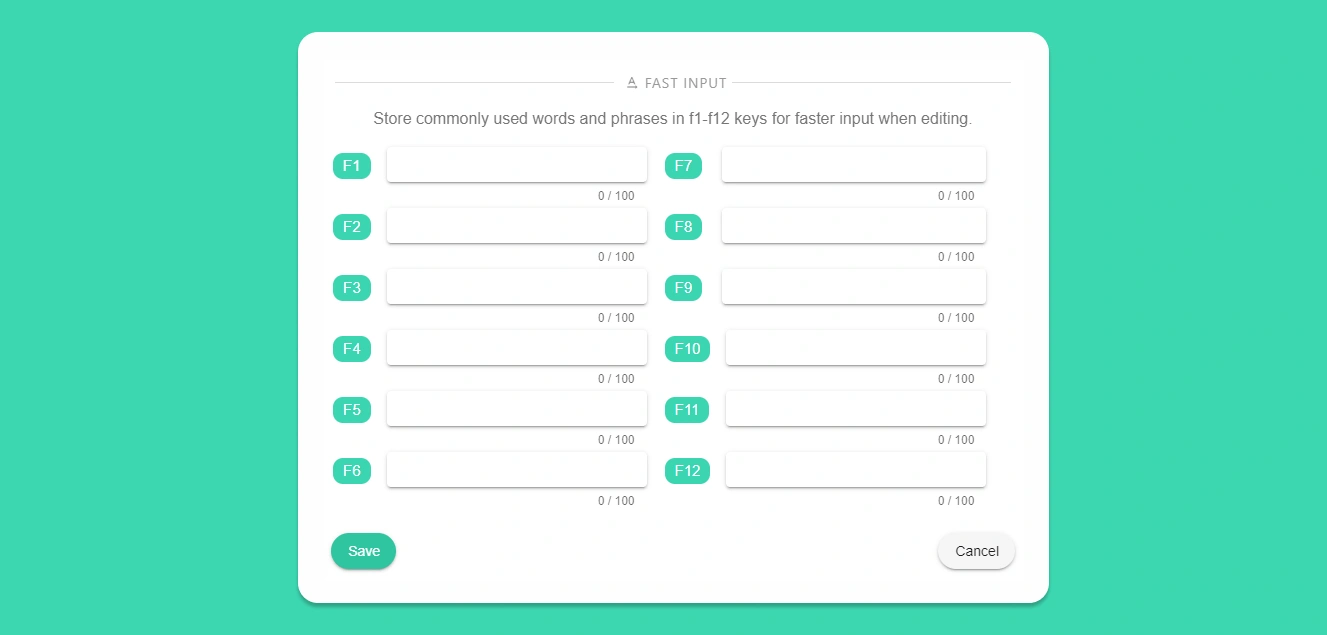
This feature is not to be confused with the personal dictionary, which is accessed from the top right corner.
8. Account Management
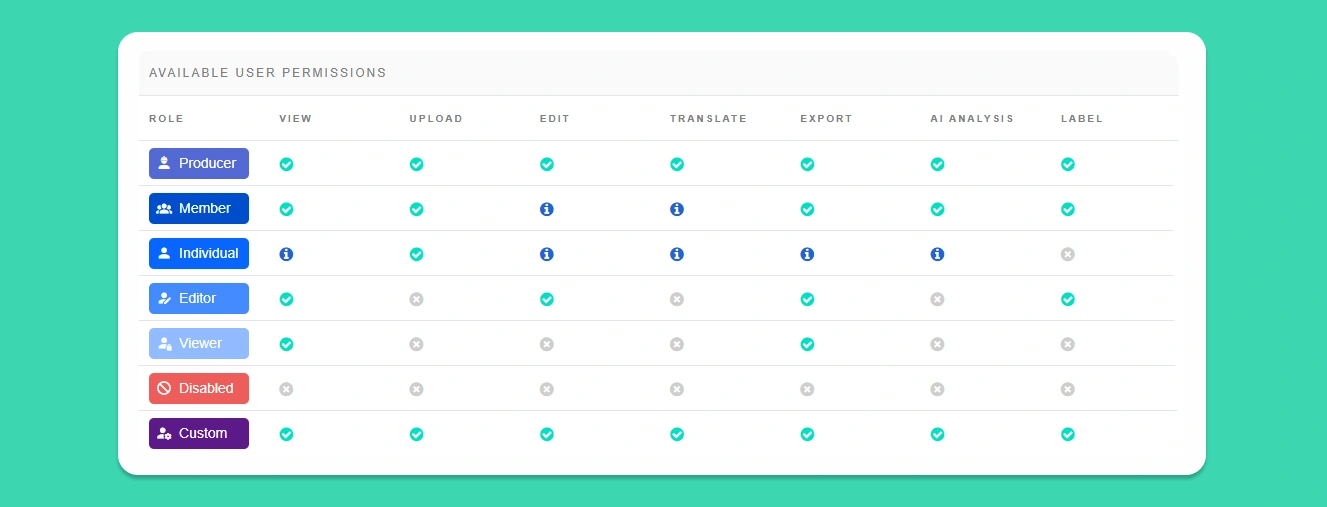
Users can set permissions and access controls in the Management tab on the side panel. This tab is not visible to users on the Standard/Free plan.
To add a new user, click the Add New Member button, then enter the user's email ID to invite them to Taption.
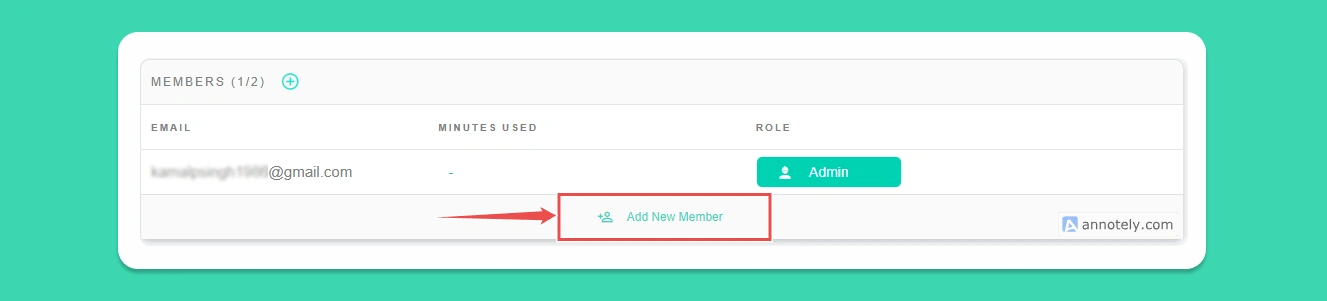
Once the new user has accepted the invite, you can assign them any of the several available roles. Each role comes with a set of permissions that allow or restrict specific functions.
Help and Support
Taption is headquartered in Seattle, USA. The company only offers email-based support. Response time is quick, and all queries are addressed within 24 hours.
An FAQ section accessible from the side menu provides answers to the most commonly asked user queries.
We feel that Taption is not a complex application, and users are unlikely to face any major issues while using it.
Taption in Review
We found Taption a simple yet powerful tool that delivers on all it promises.
What We Love About Taption
- It's super fast. In fact, Taption is one of the fastest transcription services we have tried.
- Clean UI, despite it being a powerful platform
- Editing is simple. Can edit videos without the use of any third-party tools
- Very reasonably priced compared to the competition
- It supports a wide variety of languages and is especially effective for CJK languages
Where There's Room for Improvement
- Integrates with only a select few apps
- Could use a tagging feature
In the final analysis, we believe that Taption is a great value-for-money tool that packs a lot of features without becoming bloated. We recommend Taption to businesses and solo content creators looking for efficient AI-based transcription services that meet their needs.
Score breakdown
2.9 = 0.45 × 3.63 capability + 0.40 × 1.50 publisher fit + 0.15 × 4.50 cost
Σ (criterion rating × weight) across 10 criteria · scale 1 (poor) → 5 (excellent)
The tool achieves 90% accuracy, which is lower than industry-leading benchmarks but offers superior performance for CJK languages.
18% of capability · What we check: Word error rate on real interviews, including accents, crosstalk and background noise.
The platform supports over 50 languages and includes specialized optimization and translation memory for CJK language workflows.
12% of capability · What we check: Number of languages transcribed and translated.
The interactive subtitle editor and text-based video cutting feature provide a highly efficient interface for verifying and editing content.
12% of capability · What we check: Tools to check transcripts against audio and correct them quickly.
The tool offers exceptional processing speeds, capable of transcribing a 20-minute video in under two minutes.
10% of capability · What we check: Speed of transcription and live transcription support.
Taption imports media from YouTube, Zoom, Webex, Google Drive, Dropbox and OneDrive, has an Adobe Premiere Pro plugin, and includes API access on the $69/month Bulk plan; there is no CMS integration.
10% of capability · What we check: Connections to CMS, recording tools and an API.
It includes useful collaboration workspaces, AI summarization, and speaker labeling, though it lacks dedicated editorial workflow tools for newsrooms.
10% of capability · What we check: Quote extraction, summaries, search and collaboration.
Automatic speaker labeling is included as a standard feature to distinguish between different voices in a recording.
8% of capability · What we check: Accuracy of labelling who said what.
The tool provides comprehensive export options including SRT, VTT, PDF, and MP4, with the added capability to burn in bilingual subtitles.
8% of capability · What we check: SRT and VTT captions, timestamps and document exports.
Taption uses HTTPS, role-based permissions and user-controlled deletion, but SOC 2 and ISO 27001 are still in progress and it makes no explicit commitment against training on customer audio.
8% of capability · What we check: Encryption, retention controls and no training on customer audio.
The platform supports video processing but is constrained by a 2GB file upload limit on its standard tier.
4% of capability · What we check: File formats and sources accepted.
Taption scores 2.9/5 in Benchmark Grid's independent Best Transcription Software benchmark (benchmarkgrid.com/best-transcription-software/taption, verified Oct 19, 2026)
Strengths & limitations
Strengths
- Exceptional transcription speed: 20-minute video transcribed in under 2 minutes
- Superior accuracy for CJK (Chinese, Japanese, Korean) languages where most tools struggle
- Automatic speaker labeling included
- 15 minutes of free transcription for all new sign-ups
- Flexible pricing tiers from pay-as-you-go to bulk usage
Limitations
- 90%+ accuracy is lower than some competitors offering 95-97%
- Standard tier has 2 GB file upload limit
- Less well-known than some competitors, potentially fewer integrations
Who uses it
We haven't detected any publishers running Taption yet.
Cost of ownership
Pricing
Free tier; Premium $12/month for 120 minutes. (vendor pricing page, verified 2026-08-06)
Pricing unclear for your setup? — we'll make the introduction. Free, and it never affects the score.
Cost data sourced from vendor pricing pages and community signals. Vendors may dispute any factor.
What users say
Sources: Blog 40% · G2 20% · Trade press 20% · Product Hunt 20%
Most discussed
Recent quotes
"Having used the product for academic transcriptions, this reviewer appreciates how it captures vocabulary accurately and integrates with Google Drive for efficiency."
Positive·G2·2w ago
"Compared to other AI-based transcription tools available in the market today, we found Taption to be one of the most affordable options."
Positive·Trade press·11mo ago·via State of Digital Publishing
"I am more or less blown away at its accuracy. It also does seem to be easy to use"
Positive·Blog·via AppSumo
"Automatically transcribe and add captions/subtitles to your videos. https://www.taption.com/ supports 30+ languages and tailored features for videos in Chinese and English"
Positive·Product Hunt·5y ago
5 mentions from 4 independent sources, each read and scored by our analyser. Mentions we could not tie to a real user, and those flagged as promotional, are excluded. Sentiment is opinion, and is independent of the verified publisher adoptions shown above.
The company behind Taption
Company facts come from an independent business-data record rather than the vendor's own site.
- Founded
- 2020
- Employees
- 2
- Ownership
- Self-Owned
Compare Taption
The head-to-heads publishers look at most, then the closest contests in the same benchmark.
FAQ
How is Taption scored?
Taption scores 2.9 out of 5 in Benchmark Grid's independent Best Transcription Software benchmark. The overall figure blends capability (45%), publisher fit (40%) and cost of ownership (15%). Capability is itself a weighted average of 10 criteria; the heaviest are transcription accuracy (18%), language coverage & translation (12%) and editing & verification workflow (12%). Vendors cannot pay for a score.
What size publisher is Taption built for?
Taption is built for small and local publishers and mid-market publishers. That is the vendor's own stated target, and it is one of the inputs to our publisher-fit score — a platform that suits a national newsroom often carries more operational load than a small one can absorb.
What does Taption cost?
Free tier; Premium $12/month for 120 minutes. (vendor pricing page, verified 2026-08-06) Our cost-of-ownership score is 4.5/5, which weighs pricing transparency, entry cost, implementation cost, hidden-fee risk and ongoing cost. Ask the vendor for a written first-year figure that includes implementation before you commit.
Can Taption pay for a better score?
No. Scores come from our editorial review of the product's documentation, demos and public evidence. A vendor can claim this listing or request a re-review, but nothing they buy changes a score or a position.
Verify a claim
Enter a claim about Taption and our AI will check it against the benchmark data on this page. Claims we have already fact-checked are listed below.
3 verifications remaining
